

|
|
|
|
|
|
This topic uses the example of a termination with no Employment Termination Payments (ETPs) to explain the basic termination process. It does not cover Employee Terminations records.
Further Reading: For a full explanation of the termination process, see the Australian Payroll Termination manual on the website.
When an employee ceases working for your company, you need to draw up their final pay. The basic termination process has the following steps:
In this example, you opened a manual pay after closing Standard Pay # W/1 so the Pay Status form shows the following details:
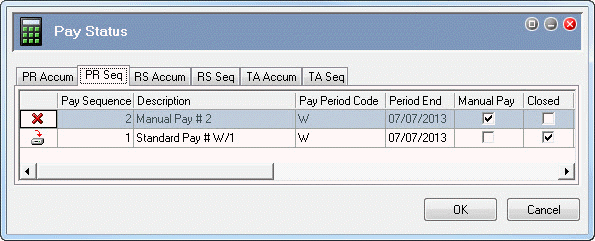
Linda Johnstone is a weekly employee who is resigning, and her termination date is 05/07/2012. Linda received her final week’s pay in closed Standard Pay # W/1. You will create Linda's termination transaction in a manual pay to avoid delays in the standard pay run for the whole organisation if any problems occur with Linda's termination pay.
In the following topics you will:
Note: You do not add a taxation override in this scenario because Linda is receiving her annual leave as a single payment on termination. If Linda took her annual leave before her termination date, then you would use a taxation override.
 |
Topic: 39220


