

|
|
|
|
|
|
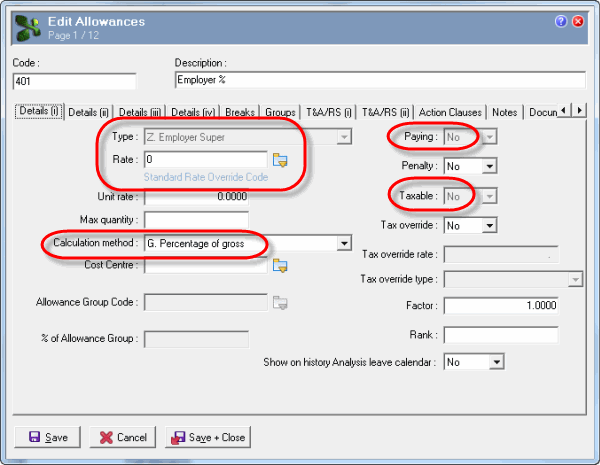
The following table explains the relevant Details (i) tab fields:
Field |
Option |
|---|---|
Type |
Z. Employer Super Employer Superannuation Allowance Type that Exolvo uses to generate all employer superannuation contributions. These may be either legislative or an ‘over-and-above’ calculation for the employee. Selecting this option disables the Details (i) tab | Paying field. When you tab to the next field, Exolvo sets Paying to "No" because all Z-type allowances are non-paying. Z-type allowances update the employee's Payroll | Payroll | Accum (i) | Employer super field. A. Allowance Used for superannuation allowances, such as defined benefits. |
Rate |
You must select an override rate (Rate calculation = "A. Override Rate"). When payroll rules are used to create the superannuation allowances, they use the rate defined in the Employee Super Funds | Allowances | Employer (%) field. |
Calculation method |
G. Percentage of gross Recommended option. Exolvo will calculate superannuation based upon the employee’s total gross earnings for the relevant sequence. If allowance has Type = "Z. Employer Super", then the allowances contributing to the total gross earnings must have Use in Super Calculations = "Yes". Other options You can also use “I. Percentage of allowance group” or “F. Fixed”. |
Important: Do not use "A. Super calc with monthly minimum". If you use this type of allowance, then RESC values will not be correct, and pays will not process correctly. |
|
Paying |
No - Employer contributions are non-paying allowances. Disabled and set to "No" when Type = "Z. Employer Super". |
Taxable |
No - Employer contributions are not taxable. |
|
|
|
 |
Topic: 14883


