

|
|
|
|
|
|
When an employee submits a super-fund request, you are notified by email.
The Request Type column shows whether the request is for a new super fund or an existing super fund has been edited. If an existing super fund has been edited, then the change is shown in brackets. In the example below, Brent has edited his KiwiSaver Fund and reduced the Employee % from 4 to 2, so ESS displays (-2).
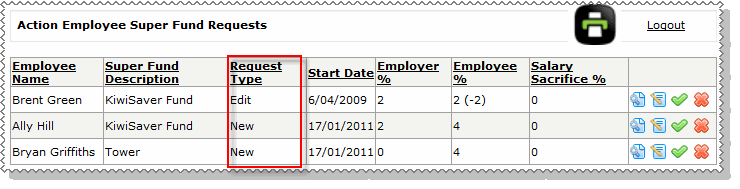
You have the following options.
|
Click the View icon to open the super-fund request in a read-only form. Approve, Decline and Edit buttons are displayed at the bottom of the form. |
|
Click the Edit icon to open the super-fund request in an editable form. Update the request as required and click Submit to save your changes. You then need to approve the request. |
|
Click the Approve icon to approve the super-fund request. |
|
Click the Decline icon to decline the super-fund request. |
The employee is notified by email when you approve, decline, or edit their request. |
|
|
|
|
 |
Topic: 37887


