Previous page

Next page

Attach Appointment to Employee

Use the following procedure to attach an Appointment record to an employee.
  1. Open the employee record, and navigate to HR | Appointments | Appointments tab.
  2. In Edit mode, press Insert to add an Appointment record.
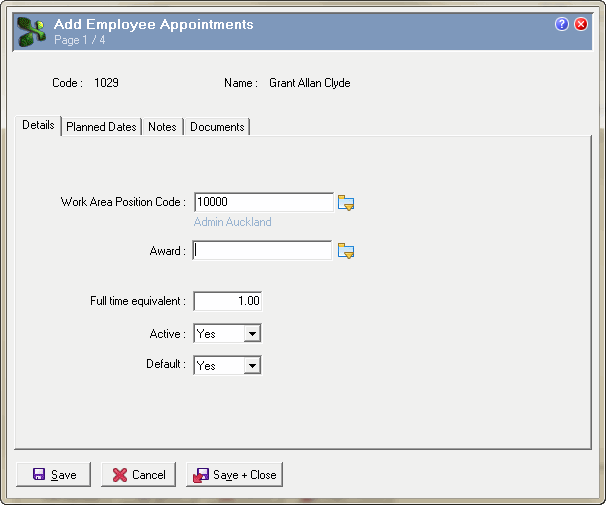
  3. Select the employee's Work Area Position Code.
  4. Select the employee's Full time equivalent.
  5. Select Active = "Yes" and Default = "Yes".

    Details

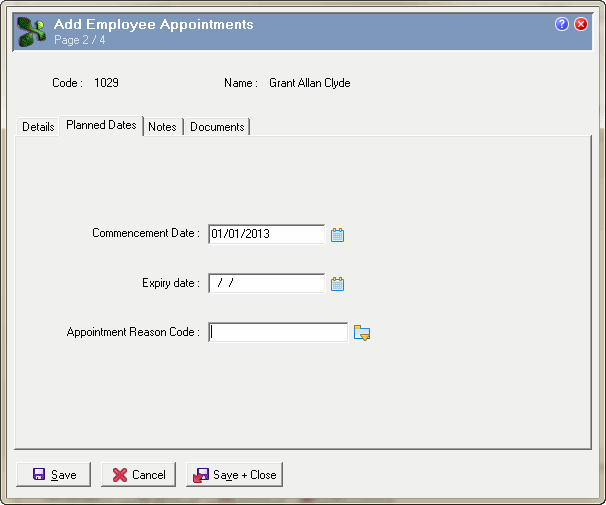
  6. Click the Planned Dates tab.
  7. In the Commencement Date field, select the start date of the employee's appointment.

    Planned dates

  8. Click Save + Close.

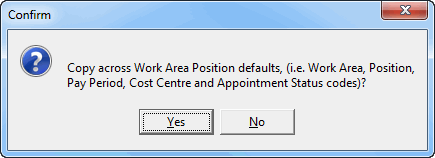
    The following message appears:

    Appointment message

    Clicking "Yes" updates the Work Area, Position, Location, and Department on the Payroll tab and Employee status on the Contract tab.

Previous page

Next page

Topic: 39566