

|
|
|
|
|
|
You can update any active field in the Details section. Simply edit a field and submit your changes to the database.
Your manager may also have access to this information and be able to view and update selected fields.
Important: Mandatory fields are marked with an asterisk (*).
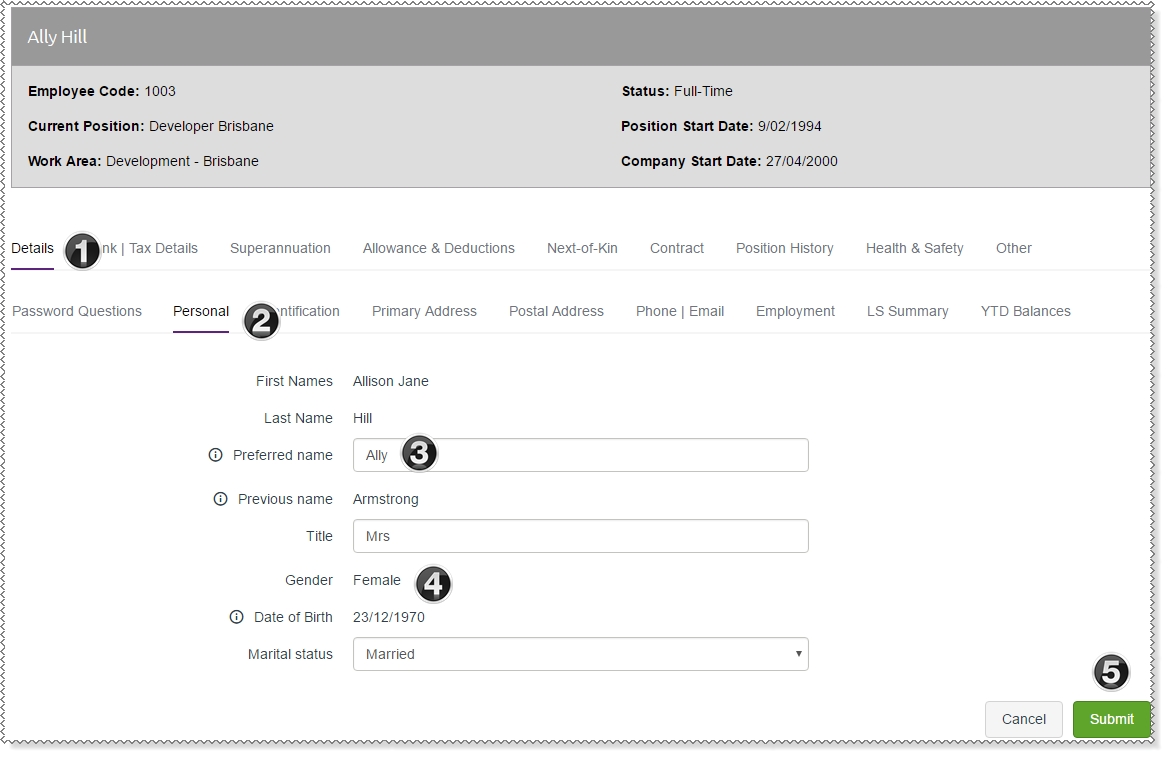
|
Current tab page. |
|
Current sub-tab page. |
|
Text box indicates that the field can be edited. |
|
Read-only field. |
|
Click Submit to save changes directly to the database. |
The following example shows how to change your address details.
You are on the My Details | Details | Personal (i) tab.
Note: When you edit your details you must click Submit before you move to another tab page.
Your details are updated immediately — manager approval is not required. However, your manager can update some of your details for you.
|
|
|
 |
Topic: 30153


