

|
|
|
|
|
|
Use the following procedure to record a course that you have attended.
The Course Attendance form appears.
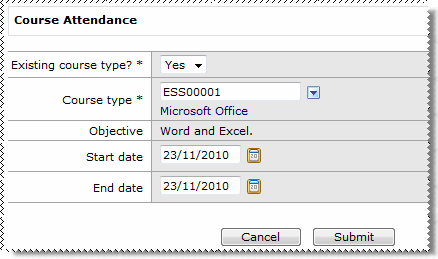
Field |
Details |
Existing course type? |
Whether the course type already exists (is displayed in the Course type lookup below). |
Course type |
When Existing course type = Yes, select the Course type from the lookup. When Existing course type = No, enter a description for the course type. |
Objective |
Active when Existing course type = No. Information about what you achieved from the course. |
Start date |
The date that you started the course. |
End date |
The date that you finished the course. |
 |
Topic: 34711


