

|
|
|
|
|
|
To add a new super fund:
 link beside the My Current Super Funds heading.
The Enter Superannuation Fund form appears.
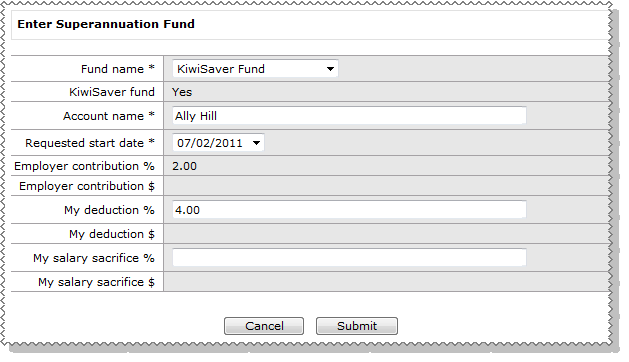
For more information about Super Funds, see My Superannuation.
Field |
Details |
Fund name* |
Select the superannuation fund that you require from the list. KiwiSaver funds are excluded if you are not eligible. |
KiwiSaver fund |
The information that you can enter in the remaining fields on this form is controlled by whether the fund is a KiwiSaver type fund. This field is read-only. |
Account name* |
Enter an account name for the fund. This field defaults to your name. |
Requested start date* |
Your next two pay periods are displayed so you can select when you want your contributions to start. |
Employer contribution % |
Discuss with your employer how you should complete these fields.
|
Employer contribution $ |
|
My deduction % |
|
My deduction $ |
|
My salary sacrifice % |
|
My salary sacrifice $ |
You can only modify superannuation funds that have commenced. If you are waiting for a fund to be approved, then you cannot add or edit a fund until the current request is actioned.
When you submit a new Superannuation Fund request:
link beside the My Current Super Funds heading is hidden.|
|
|
 |
Topic: 37822


