

|
|
|
|
|
|
This topic shows how to adjust manual pay accumulators to match Standard Pay # W/1.
You are on the main window.
The Transaction View window appears with the Pay Sequences form.
The PTD Code for the manual pay is W14.02 (the same as Standard Pay # W/2), but the PTD Code for Standard Pay # W/1 is W14.01.
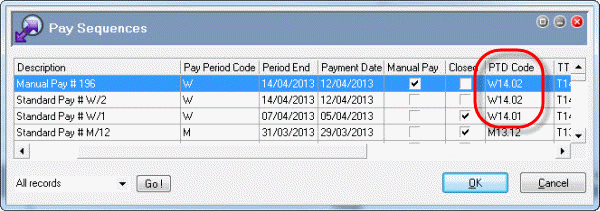
You need to change the accumulators for the manual pay so that the PTD Code is W14.01, the same as Standard Pay # W/1.
Transaction View appears for the manual pay.
Now you will view the accumulators for this manual pay.
Note: Alternatively, in the main menu click Insert | Sequence Header.
The PTD (Period to Date) accumulator is currently W14.02. You need to change it to W14.01 so that it matches Standard Pay # W/1.
You will also change the Period Number and GL Period to 1, and the Payment date to 05/04/2013.
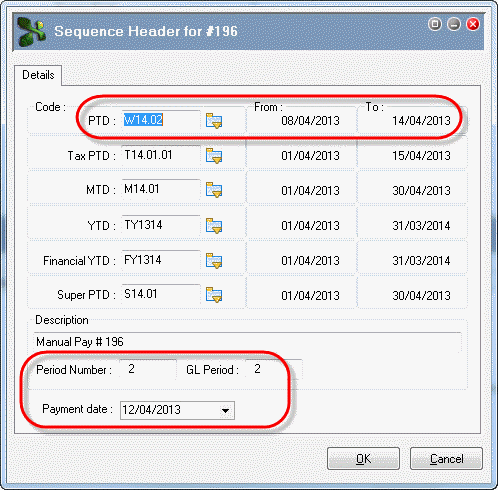
Field |
Value |
Details |
|---|---|---|
PTD |
W14.01 |
Select from pick list. |
Note: You do not need to change the Tax PTD because it covers the first two weekly pay periods — W14.01 and W14.02. |
||
Period Number |
1 |
Enter value. |
GL Period |
1 |
Enter value. |
Payment date |
05/04/2013 |
Select from calendar. |
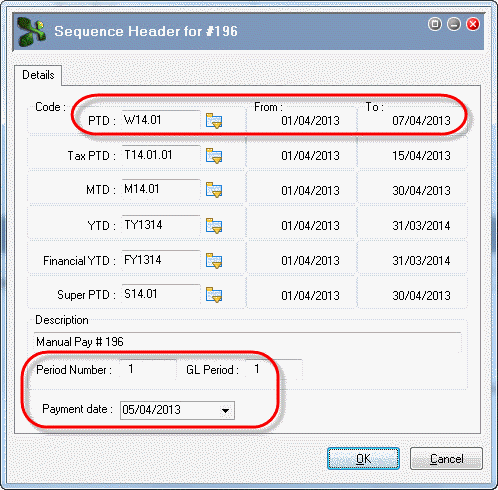
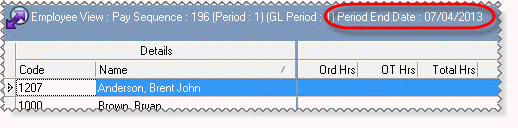
The Period End Date in the Employee View header is now 07/04/2013 because you changed the PTD accumulator.
A Confirm message appears.

|
|
|
 |
Topic: 23349


