

|
|
|
|
|
|
If you have employees with student loans, your database must contain a standard student loan deduction to generate the mandatory 12% repayment.
Important: The 'first' student loan deduction in your database must have Deduction class = "S. Student loan reduction" and Sub-class = "Standard". The 'first' deduction is determined by the alphanumeric Code value. Pay processing uses the student loan deduction with the lowest Code value to make the standard 12% repayments. For example, if the database contained student loan deductions with Code = 708, 709 and 710, then processing would use 708. Alternatively, if the deductions had Code = A708, B708 and C708, then processing would use A708.
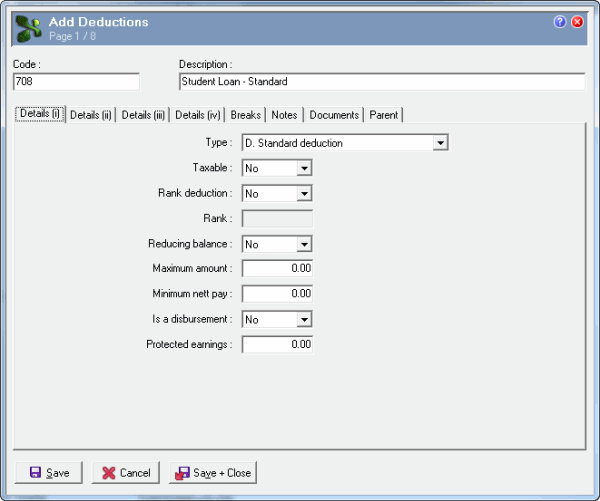
Set up the Details (i) tab page with the default values as shown in the following image:
Note: Your database should contain only one standard student loan deduction.
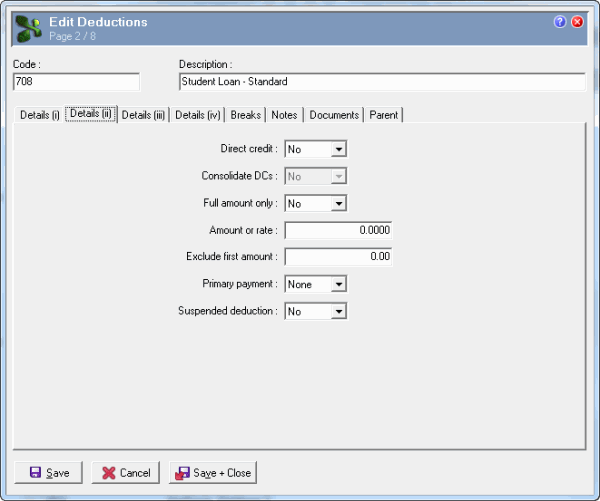
Accept the default values on the Details (ii) tab.
Important: Do not enter the student loan repayment threshold in the Exclude first amount field because it is hard-coded in the "L. Student loan" calculation method.
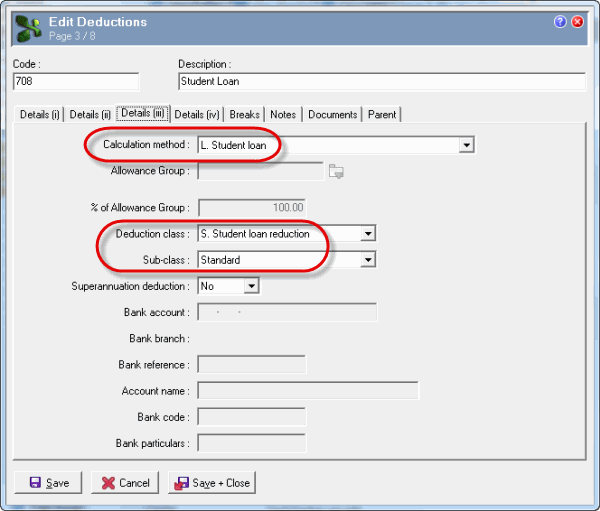
Set up the Details (iii) tab page with the following values:
Field |
Values |
Details |
Calculation method |
L. Student loan |
Student loan repayment threshold is hard-coded in this calculation method. For employees on a main tax code, processing excludes the employee's first $19,084 (annual) or $367 (weekly) of earnings and calculates the 12% student loan repayment on the earnings over the threshold. For employees on a secondary tax code, processing ignores the threshold. |
Deduction class |
S. Student loan reduction |
Used by reporting |
Sub-class |
Standard |
Basic 12% repayment |
For more information, see Standard Process.
|
|
|
 |
Topic: 18121


