

|
|
|
|
|
|
Special repayment rates only apply to an employee's secondary income for a maximum of 3 months at a time. When the IRD sends an employee a special repayment letter or certificate, the employee needs to sign the letter and give it to their employer who can then set up the special repayment rate.
In this example, you need to change Julian Garrison's student loan repayment rate to 8%, and his record contains the following values:
Field |
Values |
Tax code |
S SL |
The IRD did not change Julian's tax details so his tax code remains the same. |
|
Auto-pay |
Yes |
Julian's special repayment letter from the IRD contains the following values:
Field |
Values |
Special rate |
8% |
Start date |
01/04/2013 |
End date |
30/06/2013 |
Field |
Values |
Calculation method |
L. Student loan |
Deduction class |
S. Student loan reduction |
Sub-class |
Standard |
Field |
Value |
Details tab |
|
Percentage |
8.0000 |
Effective Dates tab |
|
Begin date |
01/04/2013 |
End date |
30/06/2013 |

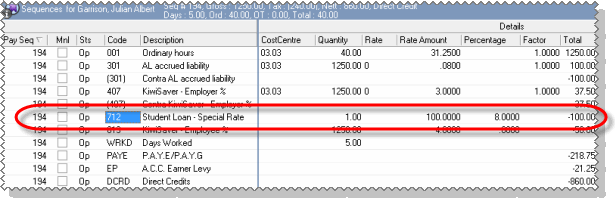
Exolvo copies the Student Loan - Special Rate deduction from Julian’s permanent transactions.
Exolvo calculates Julian’s Student Loan – Special Rate value.
|
|
|
 |
Topic: 18128


