

|
|
|
|
|
|
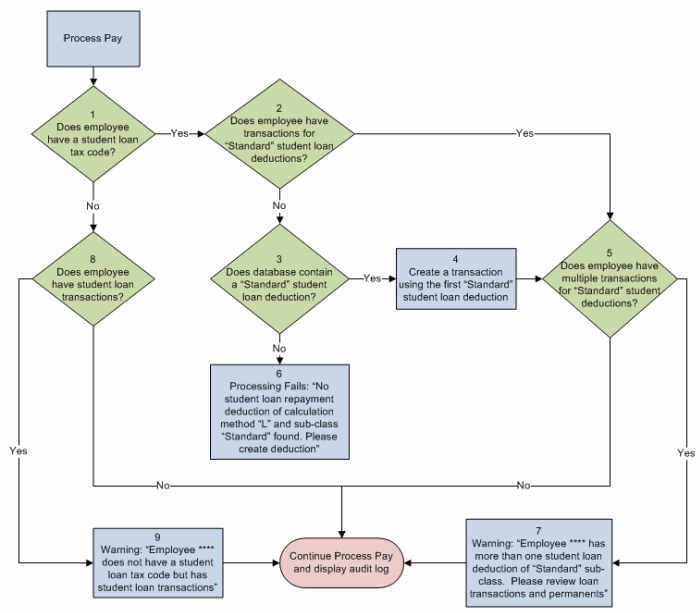
The following flowchart shows the initial checks that Exolvo makes when you process student loan transactions.
Warnings
If the employee has student loan transactions, but they do not have a student loan tax code, the pay is processed and the following warning (Step 9) appears in the audit log: Employee **** does not have a student loan tax code but has student loan transactions.
If the employee has multiple "Standard" student loan deduction transactions, the pay is processed and the following warning (Step 7) appears in the audit log: Employee **** has more than one student loan tax code deduction of "Standard" sub-class. Please review loan transactions and permanents.
If the employee has a "Standard" student loan deduction transaction, but the database does not contain a "Standard" student loan deduction, the pay is not processed and the following warning (Step 6) appears in the audit log: No student loan repayment deduction of calculation method “L” and sub-class “Standard” found. Please create deduction.
Process Pay
When you process a pay for an employee with an SL tax code, Exolvo checks (Step 2) whether the employee has any deduction transactions (entered manually, imported or from permanents) with:
If the employee has a transaction for this type of deduction, then Exolvo checks (not in flowchart) whether the transaction has a non-zero value in the Percentage field. See Student Loan Transactions - Percentage Field.
If the employee does not have this type of deduction transaction, then Exolvo automatically creates a 12% student loan transaction (Step 4) using the first Deduction record with:
See Standard Process.
|
|
|
 |
Topic: 37434


