

|
|
|
|
|
|
You need to set up or edit award rules to identify when an employee has worked on a partial public holiday, and pay them accordingly.
Important: You may need to edit many of your existing award rules and set up multiple instances of new award rules if they differ between awards.
Qualifying Clauses tab
This qualifying clause applies the award rule when the employee has worked after 19:00 on Christmas Eve.
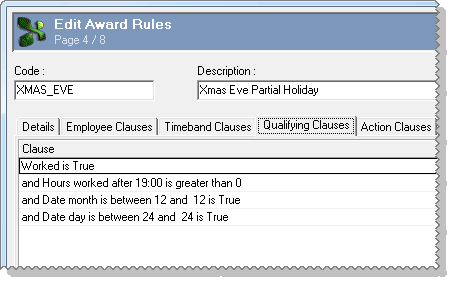
You would then set up a similar award rule for New Years Eve with "and Date day is between 31 and 31 is True".
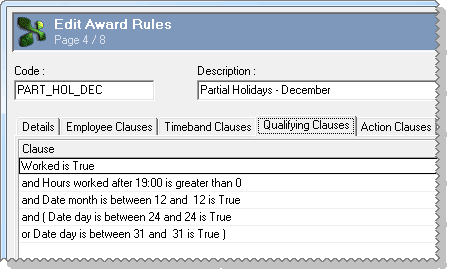
Alternatively, you could create an award rule that identified Christmas Eve and New Year's Eve, but you must use brackets to group the "Date day..." clauses.
Action Clauses tab
On the Action Clauses tab the first clause pays all hours worked on that day as ordinary hours (1.0). This clause may not be necessary because you might have other award rules that already pay ordinary hours.
The second clause pays the hours worked between 19:00 and 24:00 as extra/penalty payments (1.5).
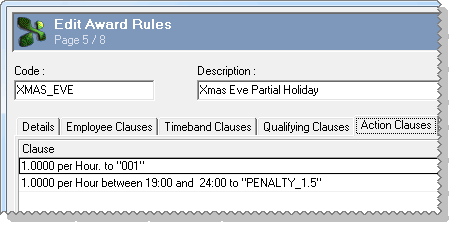
For example, if an employee worked from 16:00 to 24:00 on Christmas Eve, they would be paid 8 ordinary hours (Factor = 1.0) and 5 extra/penalty hours (Factor = 1.5). As a result, then would receive double-time-and-a-half (2.5) for the 5 partial public holiday hours.
 |
Topic: 40595


