

|
|
|
|
|
|
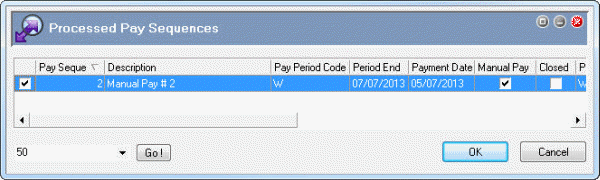
This topic shows how to close a manual pay.
You are in the main window.
The Processed Pay Sequences form appears.
The Payroll Accumulator Periods form appears.
Important: You cannot change accumulators in the Payroll Accumulator Periods form.
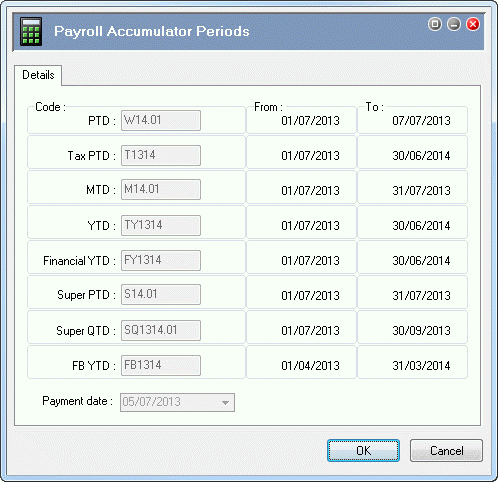
You should always check accumulators when you close a manual pay to ensure that your reports are accurate.
If the manual pay had the same accumulators as a closed standard pay that you had run reports on, then you would need to run the reports again to include the manual pay.
If these accumulators were incorrect, you would have to click Cancel, open Transaction View, select the pay sequence, and then press Ctrl+A to edit the accumulators. After you corrected the accumulators, you would use the Process Pay command to apply the accumulators to all employees in the pay.
A Closing Pay Procedures progress bar appears followed by an audit log Confirm message.
You have successfully closed the manual pay.
PayGlobal
PAYROLL CLOSING PROCEDURES Audit Log
TREETOP LIMITED User:SUPER
Started on Wednesday, August 7, 2013, at 12:55:57 PM Ver:4.9.0.0
--------------------------------------------------------------------------------
1
2
3 Pay Sequence # 2 closing procedures COMMENCED
4
5 IntegrityOk started - 12:59:04 p.m.
6 IntegrityOk ended - 12:59:04 p.m.
7 MastUpdate started - 12:59:04 p.m.
8 TransCurrentMaster - Total records : 4
9 TransCurrentMaster - Insert records : 4
Etcetera
42 Pay # 2 SUCCESSFULLY closed
43
44 This manual pay is now CLOSED. You should now print a
45 final copy of the pay period calculation listing, and print your
46 payslips. If you have not completed your direct credit procedures,
47 you should do so now. It is recommended that you also print a
48 pay sequence detail report for this period.
49
50
51 FinaliseSeq ended - 12:59:07 p.m.
52 RebuildAccumulators started - 12:59:07 p.m.
53 Searching for Pay Sequences for pay period W
54 Marking New Pay Sequences
55 Evaluating Accumulator Definitions
56 Checking for accumulator resets
57 Evaluating Employee Accumulator Definitions : 12:59:07 p.m.
58 Evaluated Employee Accumulator Definitions : 12:59:07 p.m.
59 Updating Accumulator Employee YTDs - 12:59:07 p.m.
60 Updated from Paysequence # 2
61 Updated Employee Accumulators - 12:59:08 p.m.
62 RebuildAccumulators ended - 12:59:08 p.m.
63
64 EmployeeHistory updating - 12:59:08 p.m.
65 Updating EmployeeHistory Pay Sequence #2 - 12:59:08 p.m.
66 Updated EmployeeHistory Pay Sequence #2 - 12:59:08 p.m.
67 EmployeeHistory updated - 12:59:08 p.m.
--------------------------------------------------------------------------------
Number of lines : 67 Filename : Payroll_Closing_Procedures__SUPER_65C.TXT
Completed on Wednesday, August 7, 2013, at 12:59:08 PM
--------------------------------------------------------------------------------
Note: If you have a manual pay and a standard pay for the same period, and you close the manual pay before the standard pay, then the status of the manual pay will still be "open" because the standard pay is the parent. You cannot close a standard and a manual pay for the same period at the same time.
|
|
|
 |
Topic: 39231


