

|
|
|
|
|
|
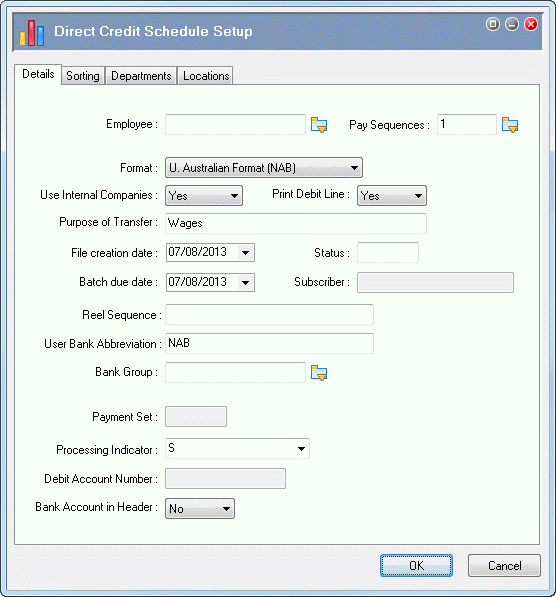
This topic shows how to enter setting for a typical Direct Credit Schedule report for Standard Pay #W/1.
You are on the Report Groups grid.
Field |
Value |
Details |
|---|---|---|
Employee |
(Blank) |
Leave this field blank to run the report for all employees or select an employee code to run the report for that employee only. |
Pay Sequences |
Click the pick list button, select Standard Pay # W/1, and click OK. |
|
Format |
U. Australian Format (NAB) |
Select from drop-down list or enter "u". |
Use Internal Companies |
Yes |
Report processing is based on Internal Companies values. |
Print Debit Line |
Yes |
Bank file includes a Debit line. |
Purpose of Transfer |
Wages |
Describe entries in the file. |
File creation date |
(Today's date) |
Date used by the banking software to determine when the file was created. Normally, it is the day that the user sends the batch to the bank. |
Status |
(Blank) |
Filters employees based on their Employee status value. |
Batch due date |
(Today's date) |
Date that the batch will be released to the bank. For example, if you will be away next week, then you can send a batch today and have it released next week. Make sure that the Batch due date is correct. If it is incorrect, then employees will not be paid on the correct day. |
Subscriber |
(Disabled) |
Enabled for formats that require an ID to identify the company. |
Reel Sequence |
(Blank) |
Default value. Enabled for formats that require a code to identify the batch. |
User Bank Abbreviation |
NAB |
Enabled when Format = "U. Australian Format (NAB)" |
Bank Group |
(Blank) |
You can run the report only for employees associated with a specific Bank Groups record. |
Payment Set |
(Disabled) |
Enabled when Format = "O. Hong Kong Bank". |
Processing Indicator |
S |
Enabled when Format = "U. Australian Format (NAB)". Options are:
|
Debit Account Number |
(Disabled) |
Enabled when Format = "I. Citibank". |
Bank Account in Header |
No |
Default value. In the export file header record, Positions 2-18 remain blank. |
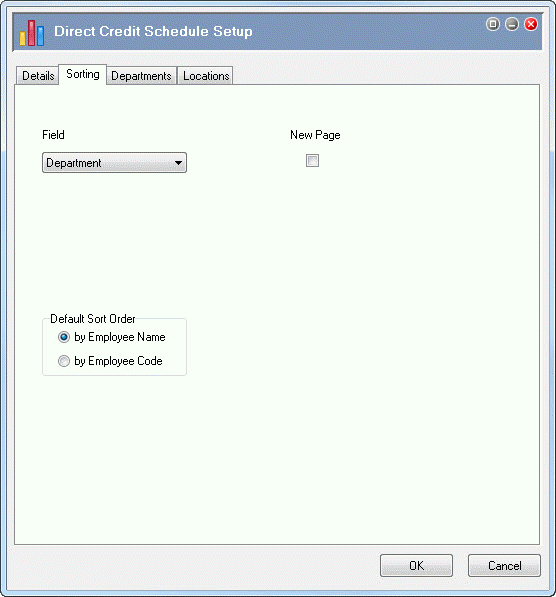
In this example, you will sort the report by department, and then by employee name.
Field |
Value |
Details |
|---|---|---|
Field |
Department |
You can sort the report by Department, Location, a Dim or (none). |
Note: Dims (dimensions) are additional entities that you can set up for the Organisation | Divisions folder. You can create up to four Dims on the Company Settings | General Settings | Dims tab. |
||
New Page |
|
If you click this checkbox, the report will start each department on a new page. |
Default Sort Order |
by Employee Name |
Default value. The report will sort employees by name within each department. |
|
|
|
 |
Topic: 39247


