

|
|
|
|
|
|
Period Superannuation QTDs records store the date range that is used to determine whether the employee has reached the quarterly maximum earnings limit (maximum earnings base).
If you use Exolvo, the Period Calendars Creation Tool can create Period Superannuation QTDs records as part of your new calendar.
If you use PayGlobal 1.95, you need to manually create one set of four Period Superannuation QTDs records per year. Date ranges for these records must not overlap.
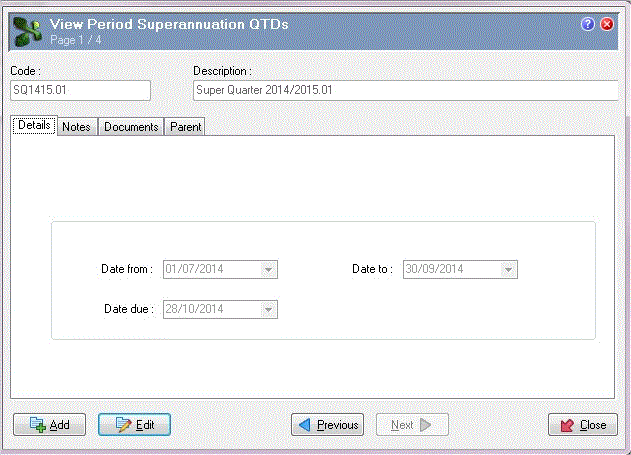
The following PayGlobal 1.95 example explains how to add a record for the first quarter of the 2014-2015 financial year.
Field |
Value |
Details |
|---|---|---|
Date from |
01/07/2014 |
Start date of the superannuation quarter. This date cannot be later than the Date to. |
Date to |
30/09/2014 |
End date of the superannuation quarter. This date cannot be earlier than the Date from. |
Date due |
28/10/2014 |
Date by which all contributions for this quarter must be paid to the funds (for reference only). This date cannot be earlier than the Date to. The default value is four weeks after the Date to. |
Important: Pay processing will generate a RESC value only if the pay's accumulators include a Superannuation PTD and a Superannuation QTD code.
Setting up part-way through a Period Superannuation QTD
If you set up the superannuation framework and Period Superannuation QTDs partway through a Period Superannuation QTD, then PayGlobal will not have accumulated the OTE for pays in which the Period Superannuation QTD was not set up. As a result, PayGlobal cannot use the values in these pays when it calculates the Maximum earnings base.
Example: You set up a Period Superannuation QTD (01/07/2014 to 30/09/2014) after closing pays for July and August. An employee is paid $20,000 each month, and the quarterly maximum base earnings is $49,430 so the employee will exceed this limit in September. However, PayGlobal will not recognise that the employee has exceeded the limit and they will incorrectly receive their full superannuation guarantee contribution (9.5% of $20,000) instead of a partial contribution (9.5% of $9,430). You would have to manually edit the transaction to correct it.
|
|
|
 |
Topic: 24513


