

|
|
|
|
|
|
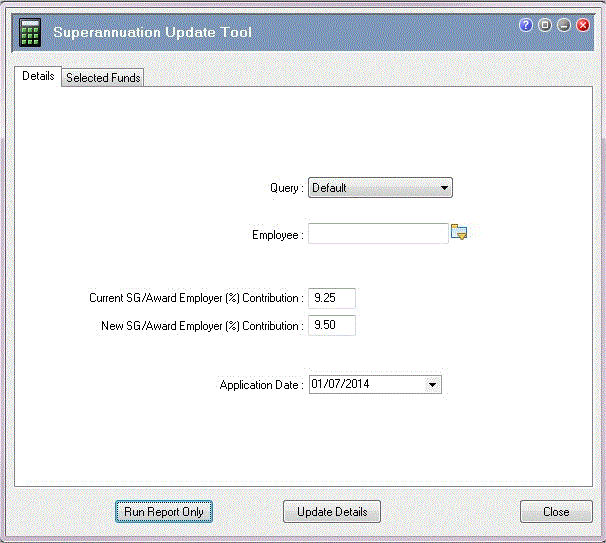
The Details tab allows you to:
Important: The Superannuation Guarantee minimum increases from 9.25% to 9.5% from 01/07/2014. You must update all SG/Award - Employer % values to the new minimum from the first pay period with a Payment date on or after 01/07/2014. The default values on the Superannuation Update Tool form reflect this change.
This example shows how to run the tool with the minimum superannuation guarantee compulsory contribution percentages for 2014-2015.
Field |
Value |
Details |
Query |
Weekly |
Select a query to filter employees or accept the "Default" value to update all employees. |
Employee |
[Blank] |
Select an employee or leave blank to update all employees. |
Note: You can select only current employees (termination date is blank). |
||
Current SG/Award Employer (%) Contribution |
9.25 |
The tool will update only Employee Super Funds records with an SG/Award - Employer (%) that equals this field value. Add in the legislative value from the current year or change it to reflect your awards, salary sacrifice arrangements or company superannuation policy. |
New SG/Award Employer (%) Contribution |
9.5 |
The minimum superannuation guarantee. However, you may need to enter a different value, depending on your awards, salary sacrifice arrangements or company superannuation policy. |
Application Date |
Mandatory field. Date that the new contribution rate comes into effect. This date could come from the ATO, other legislative changes (such as awards) or your organisation. The new minimum superannuation guarantee employer's contribution for 2014-2015 comes into effect on 01/07/2014, which is the default date when you run the tool for the first time. |
|
Important: You must enter an Application Date that relates to an open pay or a future (un-opened) pay. If you enter an Application Date that relates to a closed pay, the tool will not update any Employee Super Funds. |
||
Note: For more details, see Superannuation Update Tool - Update Details Process.
 |
Topic: 41136


