

|
|
|
|
|
|
Note: Super Admin is functionality that is assigned to a role (using Role Permissions), such as the General Admin. Super Admin is not a hard-coded admin role.
The Super Admin function allows the assigned employee or WAP to search for and impersonate manager WAPs, and then rectify workflow-associated problems. For example, if an employee’s leave request is not approved because their manager is sick, then the Super Admin function allows the Assigned employee or WAP to impersonate the employee’s manager and approve or decline the leave request.
To search for and impersonate an employee:
The employee appears in the grid below the form.
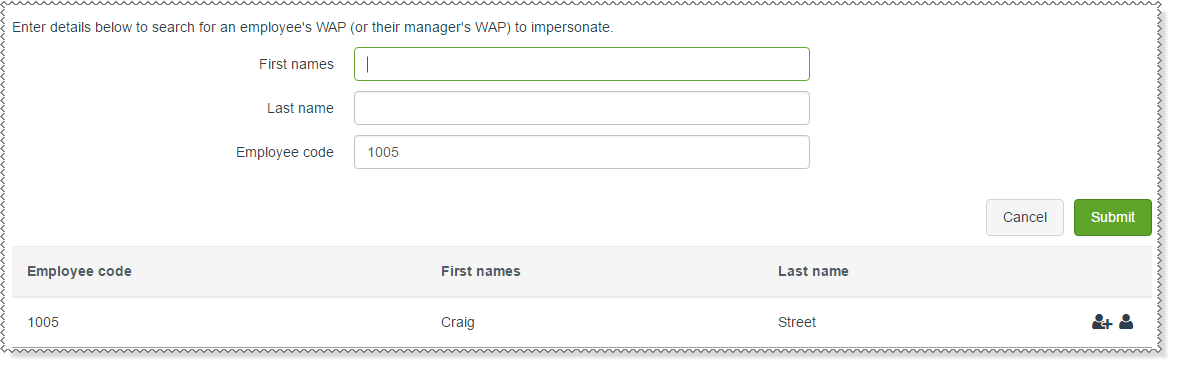
The Super Admin grid has the following options:
|
Click this icon to impersonate this employee’s manager’s WAP. |
|
Click this icon to impersonate this employee’s WAP. This icon is displayed for managers only. |
For example, using the following company structure:
The Super Admin searches for Employee code 1005 - Craig Street. Craig Street is a manager so both icons are visible.
 , then they will impersonate Bryan Brown's WAP (Craig Street's manager).
 , then they will impersonate Craig Street's WAP.
Click the Stop impersonating WAP link in the Change role section to return to the search page.
|
|
|
 |
Topic: 29057


