

|
|
|
|
|
|
You are on the View Reports Groups window.
The Employee Pay Slip Report Setup | Details tab appears.
PayGlobal will create a PDF format document.
Note: If you clicked Dot matrix printers, then PayGlobal would create a TXT format document.
The Report Destination window appears.
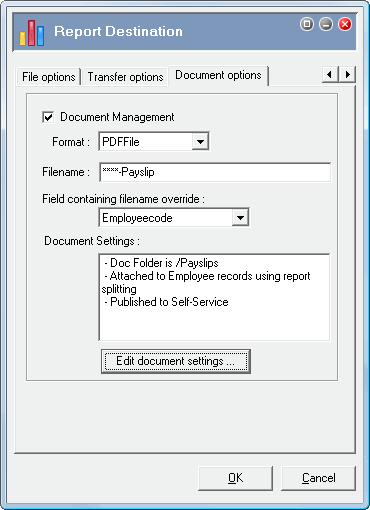
The Filename field and Field containing filename override field specify the filenames of the split payslip reports. For example, if you use the following settings, then each split report has the employee’s employeecode in the filename.
Filename= ****-Payslip
Field containing filename override= Employeecode
When you run the report, the wildcards (****) are replaced with the individual employee codes.
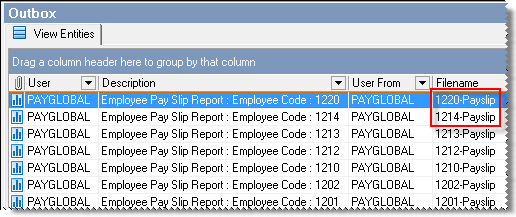
You can also type %YYYMMDD after the filename to include the date in the filename. For example, Filename= ****-Payslip%YYYMMDD.
The remaining fields on this tab page are filled using the settings that you selected earlier.
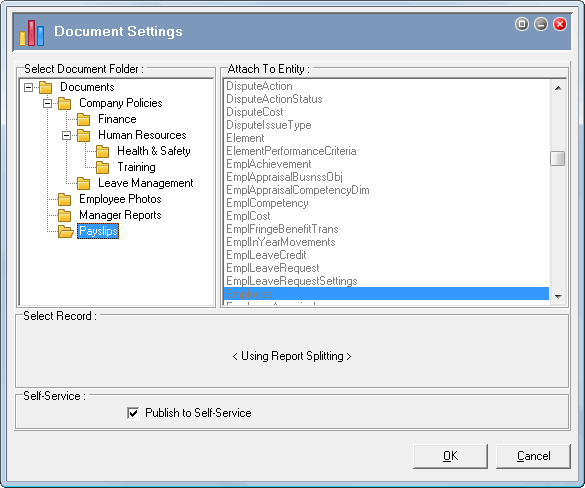
If you want to publish the payslips to ESS, then ensure that the Publish to Self-Service checkbox is ticked. If you do not tick it now, then you will have to open the Document Settings for each payslip in Document View and click Publish to Self-Service.
|
|
|
 |
Topic: 30179


