

|
|
|
|
|
|
When a leave request is split, ESS uses the Leave Approval Settings to specify which module each portion of the leave request is assigned to.
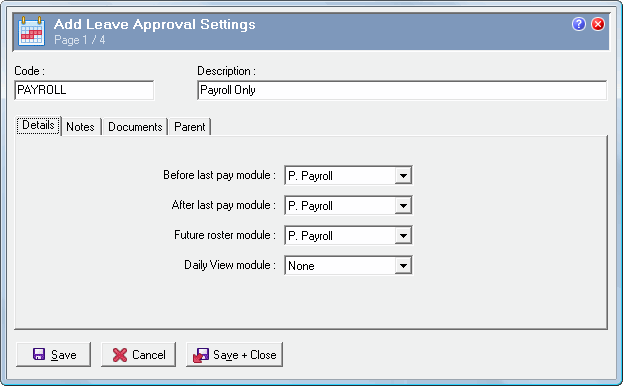
Use the following procedure to set up Leave Approval Settings records.
Field |
Details |
Before last pay module |
Portion of the leave request that contains dates before the employee's last paid date. The options are: - P. Payroll - T. Manual procedure - F. Future rosters. |
After last pay module |
Portion of the leave request that contains dates after the employee's last paid date, but not after the employee's last opened roster. The options are: - P. Payroll - T. Manual procedure - F. Future rosters. |
Future roster module |
Portion of the leave request that contains dates after the employee's last opened roster (or any future period if the customer does not use Rostering). The options are: - P. Payroll - T. Manual procedure - F. Future rosters. |
Daily View module |
Defines the Daily View module that the company uses. This setting determines whether ESS looks at the status of Rosters or Actuals when splitting a leave request. The options are: - None - Roster - Actual. The setting that you select depends on the modules that the company uses. |
Note: You cannot model these fields because modelling could potentially update a disabled record that is attached to an employee. |
|
Table 1 shows the options that you will generally select for each field relative to the module or modules the company is using. However, if the company has employees with 2. Timebands by timesheet timesheet settings, then see Table 2.
Table 1
Field Name |
Module |
||
|---|---|---|---|
Payroll only |
Rostering or Rostering and T&A |
T&A |
|
BeforeLastPayModule |
P |
P |
P |
AfterLastPayModule |
P |
T |
P |
FutureRosterModule |
P |
F |
F |
DVModule |
None |
Roster |
Actual |
The following table shows the options that you would select for employees using "2. Timebands by timesheet" timesheet settings.
If the company has employees with "1. Totals by timesheet" timesheet settings, then you can use the settings in Table 1 or Table 2 for those employees.
Table 2: "2. Timebands by timesheet" timesheet settings
Field Name |
Employee has a roster |
Employee does not have a roster |
BeforeLastPayModule |
P |
P |
AfterLastPayModule |
T |
T |
FutureRosterModule |
F |
T |
DVModule |
Roster |
None |
When partial leave requests for employees using 2. Timebands by timesheet timesheet settings are approved, the module is set to "T".
Note: The fields on this tab cannot be edited after the record is attached to employees.
|
|
|
 |
Topic: 34679


