

|
|
|
|
|
|
Use the following procedure to attach Leave Request Settings records and Leave Approval Settings records to employees.
Note: You can also use the Create Leave Request Settings command to attach records to a group of employees (see Create Leave Request Settings Command).
In the Leave request settings record, if Leave unit source = "None", then the Leave approval settings field is disabled.
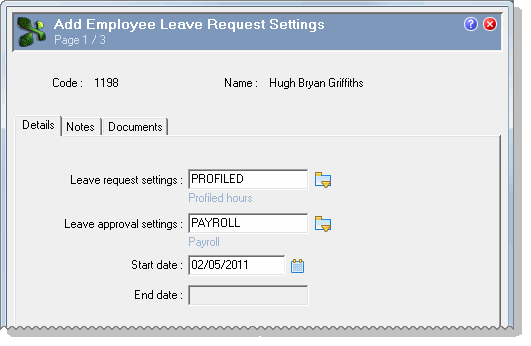
Note: When you select a Start date, you should select a date far enough in the past to allow for the MaxPastDays setting.
If MaxPastDays = 90, then you need to set the Start date to at least 90 days in the past because the Start date overrides the MaxPastDays setting.
Consider setting the Start date to at least 30 days greater than the MaxPastDays setting, such as 120 days. You cannot remove records that you have created, so having extra days gives you more flexibility.
For example, if you created an Employee Leave Request Settings record for Profiled hours with Start date = 01/01/2008 for all employees, but then you wanted to change it to keyed, you could run the Create Leave Request Settings command again with Start date = 02/01/2008. This change will not affect the days that employees can select on the calendar in the past because the dates are outside the MaxPastDays setting of 90 days.
You cannot enter an End date. When you add a new record, PayGlobal automatically adds an End date value that is one day before the start date of the new record.
After you save the Leave Request Settings record, you cannot edit it.
Multiple records
You can add multiple Leave Request Settings records for an employee.
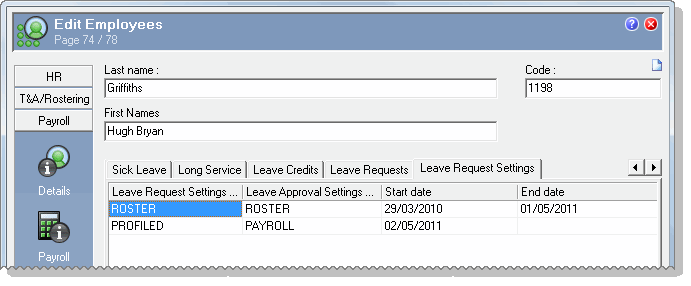
PayGlobal sorts the Leave Request Settings records by Start date.
When you add a new record:
If the employees Leave unit source changes (for example, from profiled to rostered), then the number of hours or days that the employee works may change. You must check that the employee will be paid for the correct number of units.
For more information, see Change in Setup.
Deleting records
When you delete a record:
If the employees Leave unit source changes (for example, from profiled to rostered), then the number of hours or days that the employee is entitled to may change. You must check that the employee will be paid for the correct number of units.
 |
Topic: 33312


