

|
|
|
|
|
|
The leave calendar in ESS retrieves information about historical leave from PayGlobal. ESS gets this information from the tables that hold historical allowance data. PayGlobal updates these tables when a pay is closed.
Sometimes an employee is paid for leave and then changes need to be made to the leave after the pay is closed. For example, the employee did not take all of the days that they applied for. These changes are usually made in the employee's next pay or in a manual pay.
To ensure that leave is displayed correctly in ESS, you need to follow a specific process when making these changes. You must enter an exact reversal allowance to cancel the original leave allowance. The reversal allowance must have the same allowance code, start date and end date as the original allowance and have the same quantity as the original allowance, but it must be entered as a negative. When the allowance is entered correctly, ESS will find the reversal allowance and will cancel the original allowance.
Example
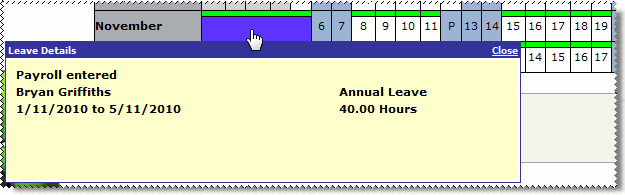
An employee requests 40 hours of annual leave over 5 days, which generates the following allowance.
Allowance |
Start date |
End date |
Quantity |
Annual leave |
1/11/2010 |
5/11/2010 |
40 |
The image below shows the request on the leave calendars in ESS.
The employee returns to work after the allowance above has been paid and informs payroll that they were sick for the first two days of their leave. They want those two days as sick leave and the rest as annual leave.
Enter the following allowances into the next pay to do the adjustment.
Allowance |
Start date |
End date |
Quantity |
Explanation |
Annual leave |
1/11/2010 |
5/11/2010 |
-40 |
The reversal for the original allowance |
Sick leave |
1/11/2010 |
2/11/2010 |
16 |
The sick leave allowance for the first two days |
Annual leave |
3/11/2010 |
5/11/2010 |
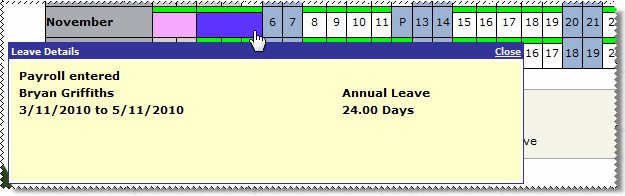
24 |
The annual leave allowance for the rest of the leave period |
When the leave is viewed on the calendars in ESS, the first two days are shown as sick leave and the other three days are shown as annual leave.
|
|
|
 |
Topic: 34901


