

|
|
|
|
|
|
The imported leave requests are now displayed in ESS, and after they are approved, you can also view them in PayGlobal.
Note: If Status was set to "Unapproved", then the leave requests will not be displayed in PayGlobal until the requests are approved in ESS.
ESS
Employees use the following procedure to view the imported leave requests in ESS.
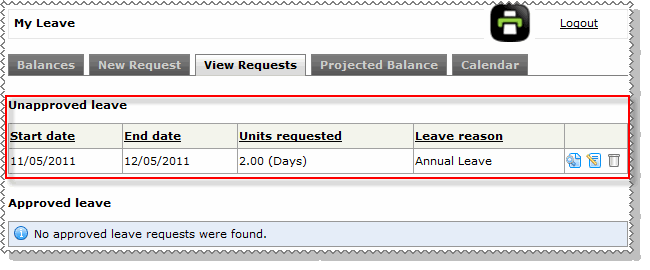
The imported leave requests are now visible on the View Requests tab.
If Status was set to "Unapproved", then the leave requests appear in the Unapproved leave section. If Status was set to "Approved", then the leave requests appear in the Approved leave section.
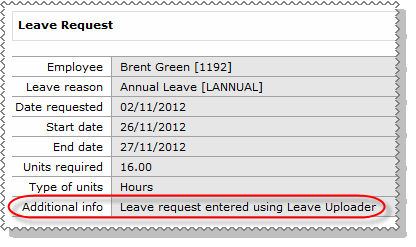
When the employee views the approved leave request, the text that was entered in the Comment field is displayed in the Additional info field.
PayGlobal
PayGlobal users use the following procedure to view the imported and approved leave requests in PayGlobal.
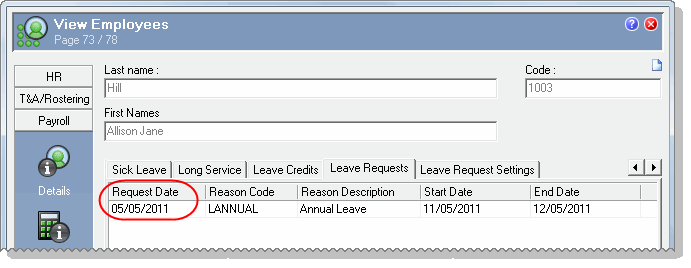
You can verify that leave requests have been imported by checking the leave requests with a Request Date of today's date.
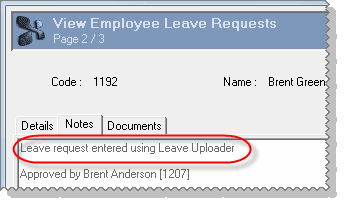
When you open the leave request record, the text that was entered in the Comment field is displayed on the Notes tab.
You have completed the Leave Uploader procedure.
|
|
|
 |
Topic: 36311


