

|
|
|
|
|
|
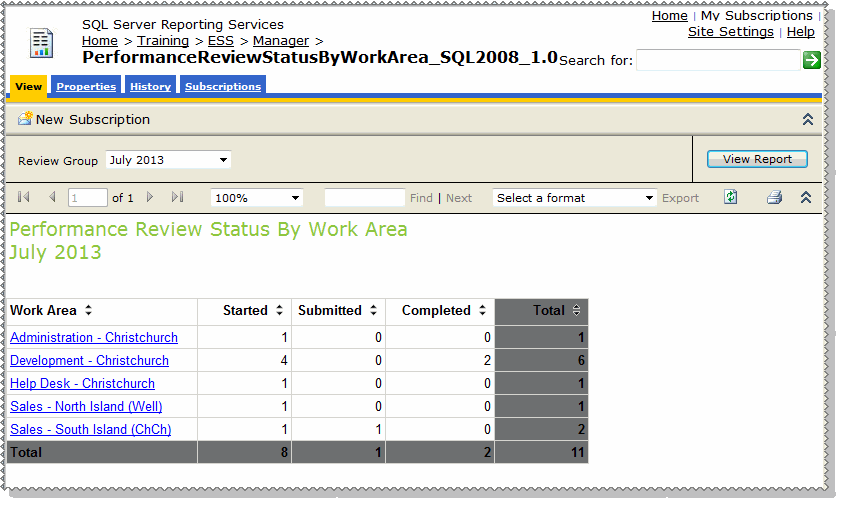
The PerformanceReviewStatusByWorkArea report displays all performance reviews in Self-Service for the selected Review Group, and the number of reviews in each status. You can use this report to identify where in the performance review process the different business area and managers are. This report is designed to run in Reporting Services, and cannot be used in Self-Service.
Does report have any dependencies?
This report requires the 'PerformanceReviewStatusByManager' drill-through report to be in the same location as the 'PerformanceReviewStatusByWorkArea' report in SQL Server Reporting Services. However, the 'PerformanceReviewStatusByManager' report cannot be run as a stand-alone report.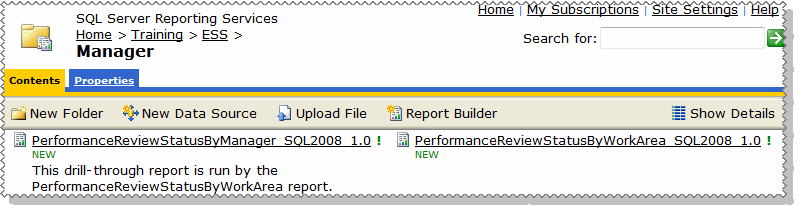
To run the report:
The report displays all performance reviews for the selected Review Group, grouped by Work Area, and the number of reviews in each status.
The results are displayed in the Performance Review Status By Manager drill-through report.
You can click your browser's back button to return to the main report.
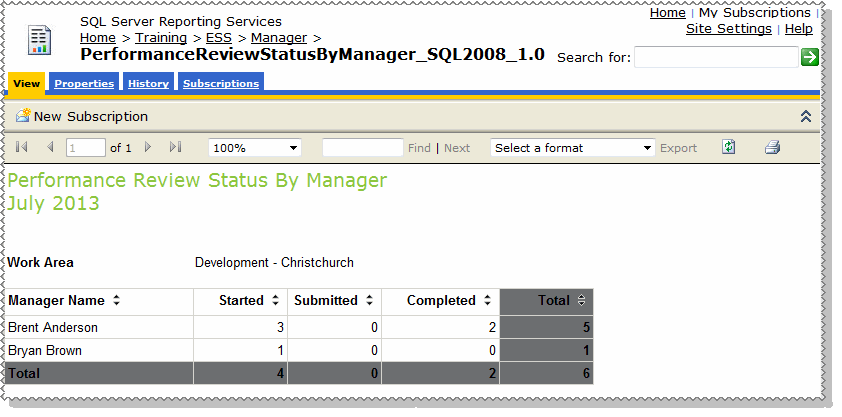
When a performance review is generated for an employee, a Performance Review item is created in the manager's Active Items. The manager can then use his Active Items to see the status of their employees' performance reviews, and who falls into each status on the report.
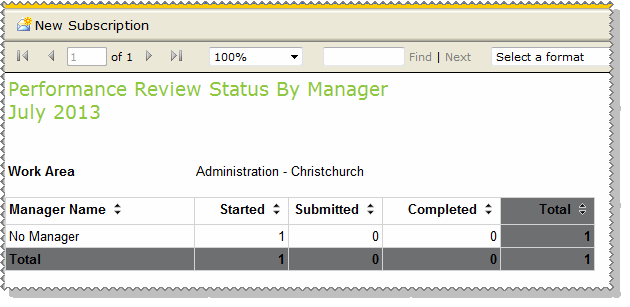
If an employee does not have a manager, for example the CEO, they will appear in a separate line on the report as shown below.
|
|
|
 |
Topic: 41300


