

|
|
|
|
|
|
This example shows the leave calculation for an employee who takes leave (Monday to Friday) with the following settings.
Display schedule source = Rostered
Leave units required source = Profiled
The employee has the following profiled and rostered hours.
|
Mon |
Tues |
Wed |
Thurs |
Fri |
Rostered |
10 |
10 |
10 |
10 |
|
Profiled |
8 |
8 |
8 |
8 |
8 |
If Pay non rostered days = Yes, then the employee is paid 40 hours (8x5). The employee is paid the 8 profiled hours on Friday even though they are not rostered to work Friday.
If Pay non rostered days = No, then the employee is paid 32 hours (8x4). The employee is not paid the 8 profiled hours on Friday because the employee is not rostered to work Friday.
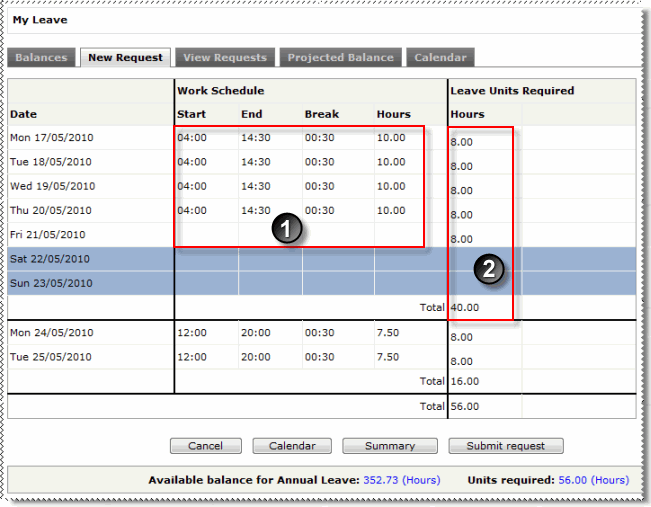
When an employee with these leave settings views the roster page in the leave request, they view their rostered units in the Work Schedule section, and their profiled hours in the Leave Units Required section (shown below). However, when they click My Roster in the menu, they view their rostered details only.
|
Rostered hours |
|
Profiled hours total. |
|
|
|
 |
Topic: 9215


