

|
|
|
|
|
|
Quick search uses a lookup to allow you to search for an employee in the organisation chart.
You have the following options:
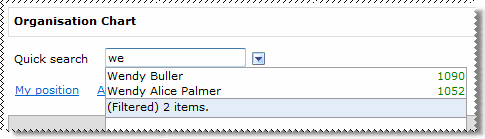
The auto-complete list appears. When you start typing in a lookup field, the items are filtered by the value you type using the "has word that starts with" clause on the code and description of the items.
For example, the following lookup list is reduced from 31 items to 2 items when you type "we".
Use the arrow keys to move to the required option in the filtered list and then press Enter to select it.
Important: If you want to view the whole list, then you must clear the text in the field.
The list automatically displays a maximum of 15 items. The status row at the bottom of the list shows the number of employees available. Click the status row to see more employees.
When you select an employee from the list, the organisation chart displays the employee's position.
 |
Topic: 28233


