

|
|
|
|
|
|
By default, the grid displays all current employees, but you can limit the number of employees by applying a filter (or query) to the employee list.
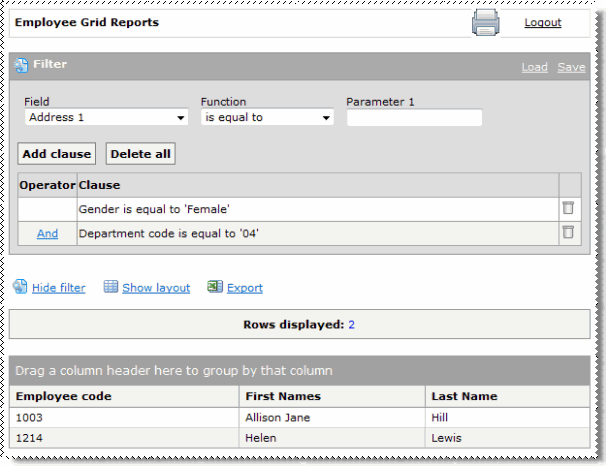
The following example explains how to view only female employees in the Development Department.
 to open the filter options.
You have completed the Gender is equal to ‘Female’ clause. The grid refreshes and displays only female employees.
Note: If you wanted to delete the clause, then you would click the Delete icon  .
.
Note: If you do not know the department codes in your database, then the next section shows you how to add the Department code and Department description columns.
You have completed the Department is equal to ‘04’ clause. The grid refreshes and displays only 2 of the original 16 employees.
The Save filter box appears.
The next time you want to apply a filter that you have saved, click Load. This link displays a list of your saved queries.
Note: You can hide the filter details while a filter is activated and then click the Show filter link to open the filter details again.
|
|
|
 |
Topic: 28289


