

|
|
|
|
|
|
When you click Employee Roster, the calendar opens on the current month.
If you cannot see the month that you require, then select the month in the combo list or click the blue arrow buttons to move through the calendar.
After you select an employee and a date range, you can select a different employee and ESS will remember the original date range. You don't need to re-select the dates each time you select a different employee.
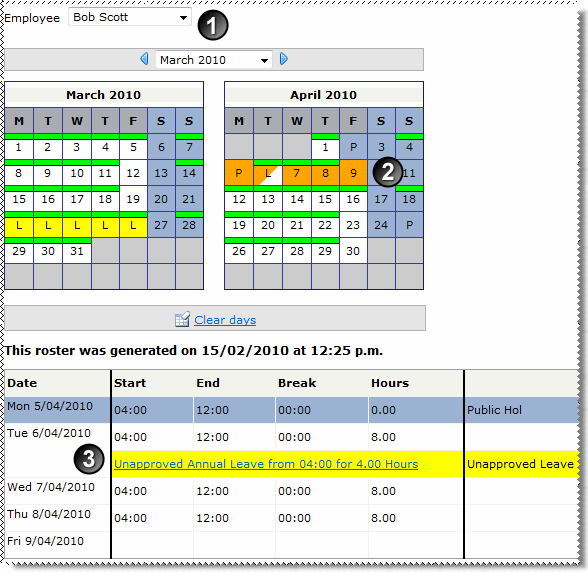
The dates are highlighted in the calendar and the employee's roster appears in a grid below the calendar.
|
Selected employee |
|
Roster is displayed for the selected days. |
|
Roster also displays public holidays and leave requests. |
Roster unknown |
The information displayed in Employee Roster will vary depending on how PayGlobal was set up to handle leave for your employees.
For more information, see:
|
|
|
 |
Topic: 28938


