

|
|
|
|
|
|
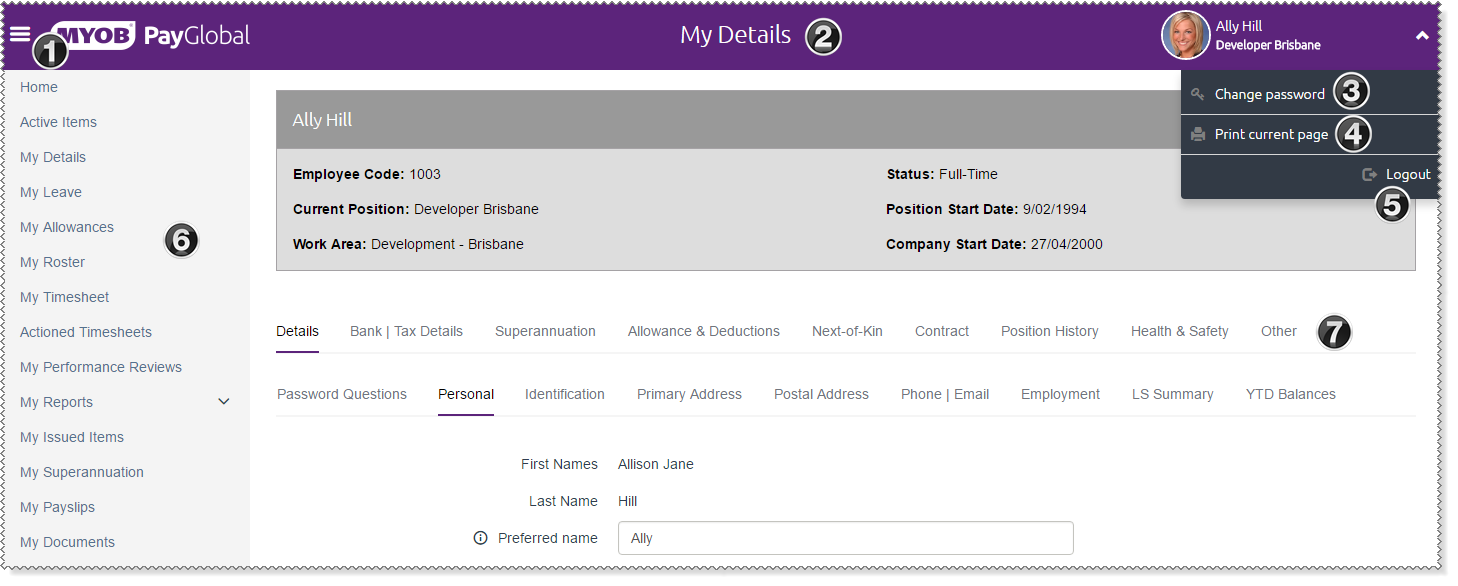
The following image shows the main navigation features of the Self-Service website.
Important: Your Self-Service Administrator sets the tab pages and fields that you can view and edit, so you may not see all the pages shown in the image below.
|
Minimise menu button Click this button to hide and show the menu. |
|
Website navigation bar This navigation bar shows where you are in the website. |
|
Help button Opens the help file on the page that corresponds to the webpage that you are on. |
|
Print button Prints the content of the current page. The menu and header will not be printed. |
|
Logout link The Self-Service website displays confidential information, so you should always complete the logout process before closing your web browser. |
|
Navigation menu The main menu lists the areas and features that are available in ESS. |
|
Tab page navigation menu The tab pages that are available in this part of the website. |
You should not click your browser's Back button while you are using ESS or you may receive an error. Use the ESS buttons and navigation menu to move around. |
|
|
|
 |
Topic: 30152


