

|
|
|
|
|
|
Active Items is like an inbox that displays items that are currently in the system, such as leave requests.
Use Active Items to monitor the progress of workflow items that you have submitted. An icon is displayed beside each workflow item to show the status of the item.
The Current tab shows all your active items with the status:
|
Action required. You must approve/decline, or action this item. |
|
In progress. Someone else must approve/decline or action this item. |
After the item is approved/declined or actioned by everyone in the workflow, then the item is moved to the History tab.
The History tab shows all your active items with the status:
|
Complete |
On the History tab, you can use the Time filter combo box to minimise the number of items that you view, such as "Past month" or "Past 3 months".
Active Item Links
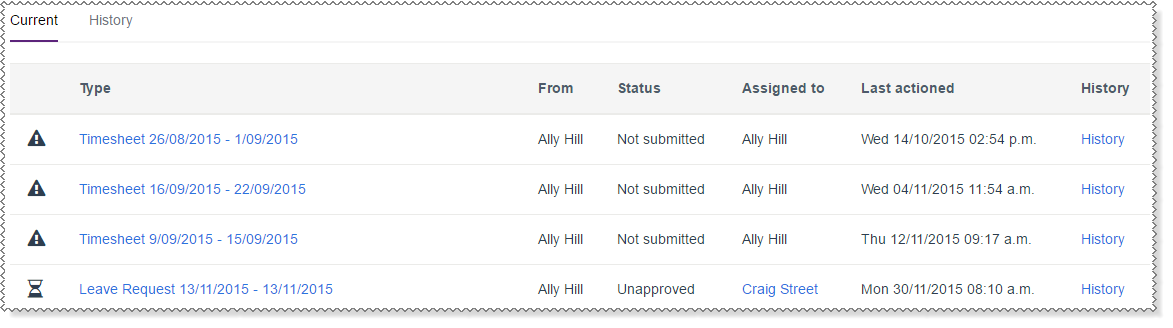
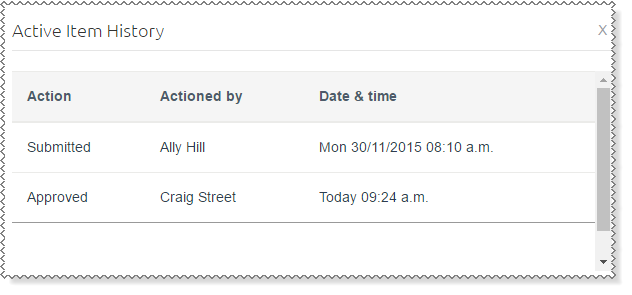
The following table explains the options available in Active items.
Options |
Details |
|---|---|
Type |
Description of the workflow item. |
From |
Original creator of the item. |
Status |
How far an item has progressed through a workflow. |
Last actioned |
Date and time the item was last stored in the system. |
History |
Actions that have taken place for the item. |
|
|
|
 |
Topic: 33406


