|
|
|
|
|
|
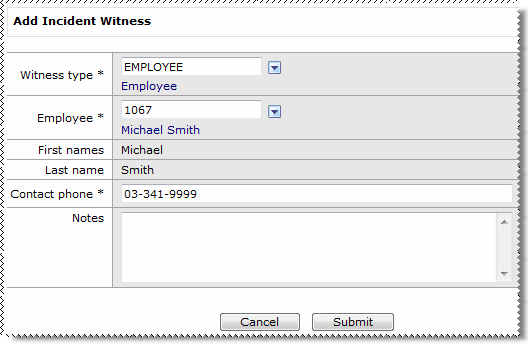
After you click the  link beside the Incident witnesses heading, the Add Incident Witness form appears
Field Name |
Details |
|---|---|
Witness type |
When Witness type = Employee, the Employee field is visible. When Witness type is not Employee, the First names and Last name fields are active. See |
Employee* |
Visible when Witness type = Employee. |
First names* Last name* |
First and last names of witness. Active when Witness type is not Employee. |
Contact phone* |
Contact phone number for witness. |
Notes |
More information about the witness. |
The Incident witnesses record is displayed on the Add Incident page.
Note: You can add multiple witnesses to an incident. If more than one person witnessed the incident, then you would repeat the preceding steps to add their details to the incident.
|
|
|
 |
Topic: 33935


 Lookup Functionality