|
|
|
|
|
|
After you click the  link beside the Injury heading, the Add Injury form appears.
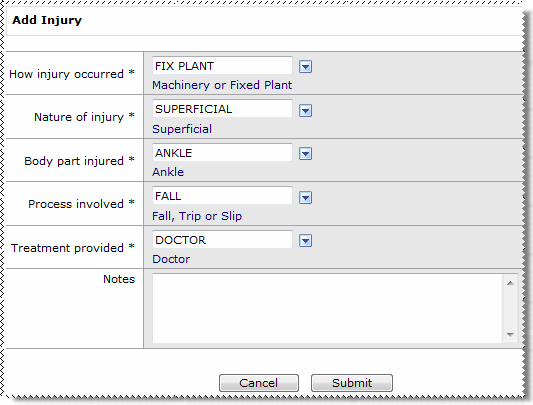
Field Name |
Details |
|---|---|
How injury occurred* |
How the injury occurred, such as "Powered Equipment". See |
Nature of injury* |
Type of injury, such as "Cut or open wound". |
Body part injured* |
Part of the body that was injured, such as "Hand". |
Process involved* |
Process involved in the injury, such as "Accidental Lacerations (Cuts)". |
Treatment provided* |
Treatment provided for the injury, such as "Doctor". |
Notes |
Further information about the injury. |
The injury record is created in the grid.
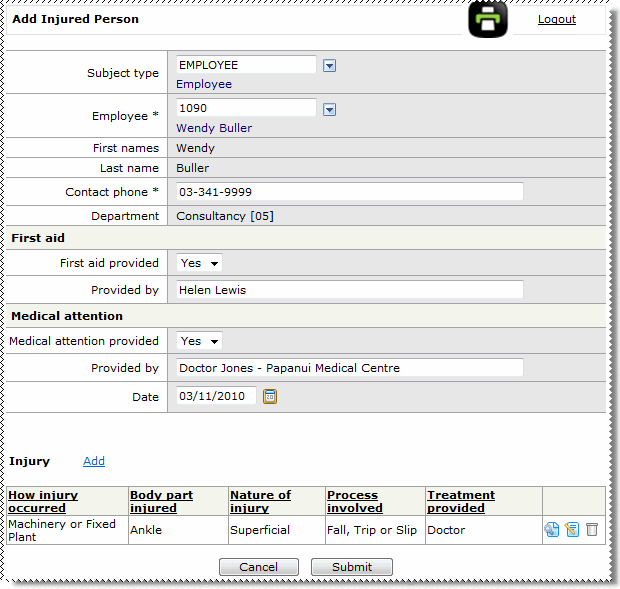
The Injured persons record is displayed on the Add Incident page.
Note: If more than one person were injured in the incident, then you would repeat the preceding steps to add their details and injuries to the incident.
|
|
|
 |
Topic: 33930


 Lookup Functionality