

|
|
|
|
|
|
When your company is using the Day by day functionality, employees can submit their timesheet daily and you can approve those timesheets each day.
Use the following procedure to approve one day.
The Timesheet Details popup appears.
If the timesheet was complete and you wanted to approve all days, then you would click the Approve timesheet link.
You can edit the hours on the employee's timesheet if required. The employee is notified by email that you have edited their timesheet.
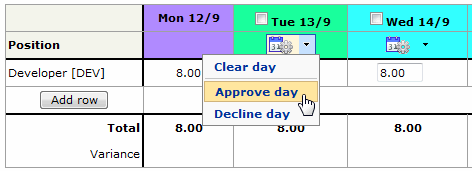
Employees can submit individual days and you can approve those days. However, the timesheet must still go through the workflow process, so the employee cannot submit all days individually and you cannot approve all days individually.
Note: You will not see the Recall timesheet option until you complete approving the timesheet.
 |
Topic: 37624


