
|
|
|
|
|
|
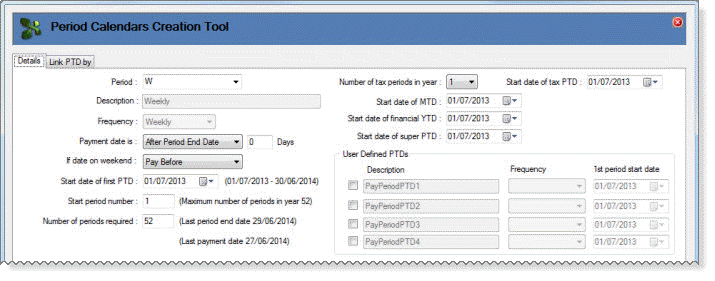
The Period Calendars Creation Tool | Details tab contains the following fields.
Field |
Details |
|
Period |
Displays a list of the Period codes currently set up in the database, such as "W" (Weekly) or "M" (Monthly). If no Period codes exist or if you want to set up a new Period, then you can enter a code value, such as "F" (Fortnightly). |
|
Description |
If you selected an existing Period code, then this field displays the description for that Period, such as "Weekly" or "Monthly". If you entered a new Period code value, then this field is enabled and you can enter an appropriate description, such as "Fortnightly". |
|
Frequency |
If you selected an existing Period code, then this field displays the frequency for that Period, such as "Weekly" or "Monthly". If you entered a new Period code value, then this field is enabled and you can select the appropriate frequency:
|
|
Payment date is |
Determines when the Payment date occurs relative to the Period dates:
|
|
Note: In Australian and UK databases, the Payment date determines the taxation rules for the pay sequence. In Fiji and NZ databases, Exolvo uses the Period End date to determine taxation rules for the pay sequence. See Period Calendars Creation Tool - Link PTD by. |
||
Days |
Determines how many days after the Period Start Date or End Date the Payment date occurs. You can enter positive or negative values. The Period Start Date and the Period End Date are treated as Day 0. Default value is 0 (zero), which is the Period End Date. |
|
Examples: Weekly pay with End date = 07/04/2013, Payment date is = “After Period End Date" and "Days" = -2. Resultant Payment date for Period created is 05/04/2013. Monthly pay with End date = 30/04/2013, Payment date is = “After Period Start Date" and "Days" = 14. Resultant Payment date for Period created is 15/04/2013. |
||
If date on weekend |
Pay Before (default) - If the payment date is on a weekend, then change it to the preceding Friday. Pay On - If the payment date is on a weekend, then do not change it. Pay After - If the payment date is on a weekend, then change it to the following Monday. |
|
Start date of first PTD |
Start date of the first PTD. The default value is the first day of the next tax year based on the database country settings. For example, in an Australian database the default value would be 01/07/2013. If you have historical details, use the Find History and Roll Calendar buttons to ensure that no gaps occur between calendars. For example, if the previous weekly Period Calendar finished on 27/03/2013, the start date of the first PTD in the next weekly Period Calendar would be 28/03/2013. The tool displays the full date range for the set of PTDs, such as 01/07/2013 - 30/06/2014. |
|
Start period number |
If you were creating a new calendar, you would enter 1. If you were setting up a calendar part-way through the year, you should enter the appropriate value and ensure that the Start date of first PTD value is correct. However, if you enter Start period number = 1, the tool will still create and number the records correctly. The tool displays the maximum number of pay periods that can be created in this tax year. |
|
Number of periods required |
Enter the appropriate number of periods based on the Frequency value. For example, if you were setting up a weekly PTD, you would enter 52 or 53. This value is also affected by the Start date of first PTD, Payment date is and Date values. The tool displays the last period end date. |
|
Note: If required, you can change the Start period number to start part-way through the year or the Number of periods required to stop part-way through the year. |
||
Number of tax periods in year |
Number of tax periods is country-specific. New Zealand: 12 or 24 Australia/Fiji: 1, 4, 12, 24, 26 or 52 United Kingdom: 12 |
|
Start date of tax PTD |
Australia and Fiji only. If you are setting up unusual tax PTDs, you can enter the start date of the first tax PTD. |
|
Start date of MTD |
Default value is the first day of the first month in the tax year, such as 01/04/2013 or 01/07/2013. |
|
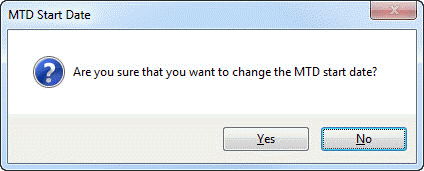
Normally, you would never change this value and if you do, the following message appears:
Yes - Start date of MTD keeps your edited value. No - Start date of MTD returns to the last accepted value. |
||
Start date of financial YTD |
Start date of the financial year is country-specific and it defaults to the appropriate values. For example, New Zealand/United Kingdom: 01/04/2013 Australia: 01/07/2013 Fiji: 01/01/2013 |
|
Start date of super PTD |
Start date of the first superannuation PTD is usually the same as the YTD. |
|
User Defined PTDs |
||
You can create up to four user-defined PTDs with the following period frequencies: |
||
|
|
|
If the database already contains a user-defined PTD, then the field will be enabled and it will display the name defined in Company Settings. You cannot overwrite existing user-defined PTDs from within the tool. To create user-defined PTD records, select the required checkbox and select a frequency. |
||
|
|
|
 |
Topic: 33336