

|
|
|
|
|
|
Employees can voluntarily make additional student loan repayments, and they usually make them as a fixed amount not a percentage of income. You set up additional repayments as permanent transactions. When the employee asks you to set up an additional repayment, you should determine the required start and end dates so you can enter them in the permanent transaction. When you open a pay for the employee, Exolvo will copy the fixed deduction across to the employee's transactions. When you process the pay, Exolvo automatically creates the standard 12% student loan transaction and calculates the voluntary fixed transaction value.
In this example, Michael Smith already makes standard student loan repayments and he wants to make an additional voluntary repayment of $20 per week from 01/04/2013 to 31/03/2014.
Michael's record contains the following values:
Field |
Values |
Tax code |
M SL |
Auto-pay |
Yes |
Field |
Values |
Calculation method |
F. Fixed amount |
Deduction class |
S. Student loan reduction |
Sub-class |
Voluntary (SLBOR) |
Field |
Data |
Quantity |
1.00 |
Rate |
20.0000 |
Note: Michael wants to pay an additional $20 per week. |
|
Begin date |
01/04/2013 |
End date |
31/03/2014 |

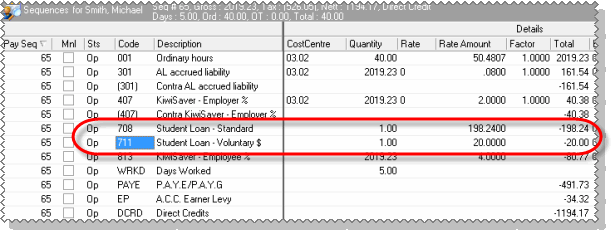
Exolvo copies the Student Loan – Voluntary $ deduction from Michael’s permanent transactions.
Exolvo automatically creates Michael's standard 12% student loan transaction and calculates his Student Loan – Voluntary $ values.
|
|
|
 |
Topic: 18130


