

|
|
|
|
|
|
If an employee has not made sufficient student loan repayments in previous years, IRD will tell their employer to deduct additional repayments to recover the shortfall. The employee has to make these commissioner-instigated repayments in addition to their standard 12% repayment.
Note: The catch-up process is not the same as the arrears payment process that uses a deduction with Calculation method = "A. Arrears payment".
You need to set up these commissioner-instigated repayments as reducing balance loans.
In this example, Jamie Dawson currently makes standard 12% student loan repayments, and his record contains the following values:
Field |
Values |
Tax code |
M SL |
Auto-pay |
Yes |
The IRD notice contains the following information:
Employee's name |
IRD number |
Total amount to recover |
Compulsory extra deduction rate |
Jamie Dawson |
xxx-xxx-xxx |
$5,000.00 |
41.67% |
Important: The standard repayment rate is 12%, but the maximum additional deduction rate is still 5%. As a result, the additional deduction is no longer 50% of the standard rate (12% * 50% = 6%), it is 41.67% (12% * 41.67% = 5%). |
|||
The following table shows extra deduction values derived for other rates:
Compulsory extra deduction rate |
Extra deduction |
33.33% |
12% * 33.33% = 4% |
25.00% |
12% * 25.00% = 3% |
16.67% |
12% * 16.67% = 2% |
8.33% |
12% * 8.33% = 1% |
The notice states that "The amount to be deducted is a percentage of [the employee's] standard student deduction that applies for the pay period and not of their gross income".
Jamie is on a main tax code so the standard deduction is 12% of his gross pay over the threshold, and the extra deduction is 41.67% of the standard deduction, which is 5% of his gross pay over the threshold so you will use this value (5.00) in Jamie's Employee Loan record.
Important: The extra deduction is 41.67% of the standard deduction, not 41.67% of Jamie's gross pay over the threshold.
The IRD has asked you make an additional 5% student loan repayment for Jamie to repay $5,000 starting from his next pay, which is 01/04/2013.
Field |
Values |
Reducing balance |
Yes |
Calculation method |
L. Student loan |
Deduction class |
S. Student loan reduction |
Sub-class |
Catch-up (SLCIR) |
See Catch-up.
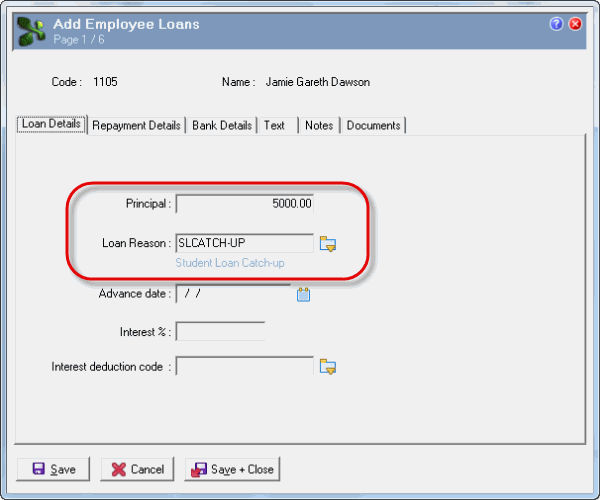
Loan Details tab
Field |
Values |
Principal |
5000.00 |
Loan Reason |
SLCATCH-UP |
Important: Do not use the interest fields for student loan repayments. |
|
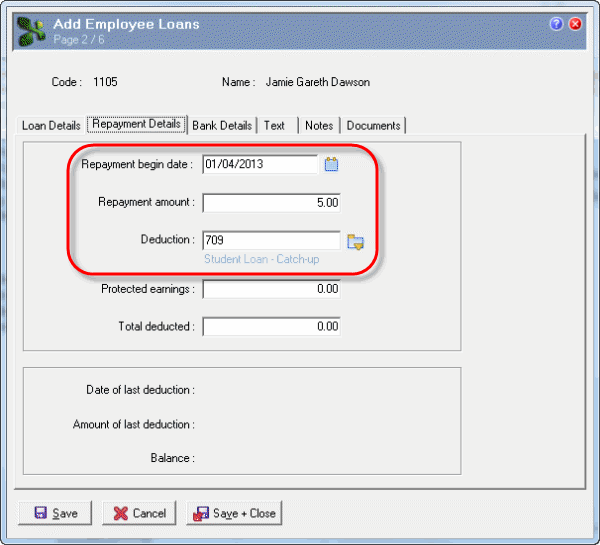
Repayment Details tab
Field |
Values |
Repayment begin date |
01/04/2013 |
Repayment amount |
5.00 |
The Student Loan - Catch-up deduction has Calculation method = "L. Student loan" so for employees on a main tax code, Exolvo excludes the employee's first $19,084 (annual) or $367 (weekly) of earnings and calculates the catch-up repayment as 5% (Repayment amount) of their earnings over the threshold. For employees on a secondary tax code, the threshold is ignored. |
|
Deduction |
Student Loan - Catch-up |
When you open Jamie’s next pay after 01/04/2012, Exolvo creates a 5% Student Loan - Catch-up transaction from his Employee Loans record. When you process Jamie’s transactions, Exolvo also creates Jamie’s Student Loan - Standard deduction.
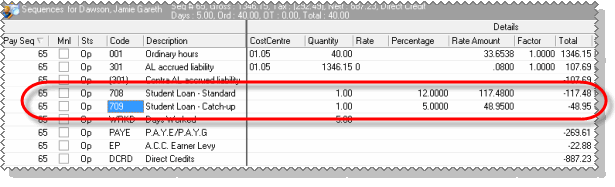
Note: You have to use Customise Columns to display the Percentage column.
Exolvo will continue generating Jamie’s 5% Student Loan - Catch-up transactions until his Total deducted value in this loan matches the Principal value, and his loan Balance is 0.00.
If the IRD send you a notice telling you to stop repayments before the employee's catch-up amount is fully paid, then you should manually change the Principal to update the Total deducted and ensure that the Balance is 0.00 so no further repayments are made.
If Jamie's tax code changes to a non-student loan tax code (see Repayment Exemption Certificate Process), his standard repayments stop automatically. However, you need to stop his Student Loan - Catch-up transactions by changing his Employee Loans | Repayment Details tab | Repayment begin date to the day after his repayment exemption ends.
|
|
|
 |
Topic: 30588


