

|
|
|
|
|
|
This topic explains the toolbar buttons in the PayGlobal Report Viewer.

Print 
The Print button allows you to print to a network or local printer. When you click this button, the Print form for your system appears.
Show the Find Text Toolbar 
When you click this button or press Ctrl+F, the Find Text toolbar appears. Enter the text you want to search for (such as Brown) in the FindText field, and then click Find Text.
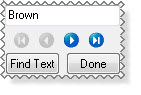
The report highlights the first instance of the text. Click the Find Next button  to highlight the next instance.
Click the Hide the Find Text Toolbar button to hide the toolbar.
Zoom buttons
Use the zoom buttons to change the report magnification.
Button |
Function |
Whole Page |
By default, the report is displayed in whole page view (Zoom = 120%). |
Page Width |
Display the report over the full width of the viewer (Zoom = 167%). |
100% |
Display the report at Zoom = 100%. |
Navigation buttons
Use the navigation buttons or keyboard shortcuts to move through the report.
Button |
Function |
Keyboard |
|
Return to the first page |
Ctrl+Up Arrow |
|
Return to the previous page |
Up Arrow |
|
Advance to the next page |
Down Arrow |
|
Advance to the final page |
Ctrl+Down Arrow |
Save as new message
When you click this button, the Report Destination form appears and you can select the destination options you require.
Close
Click this button to close the PayGlobal Report Viewer and return to the previous window.
|
|
|
 |
Topic: 23321


