|
|
|
|
|
|
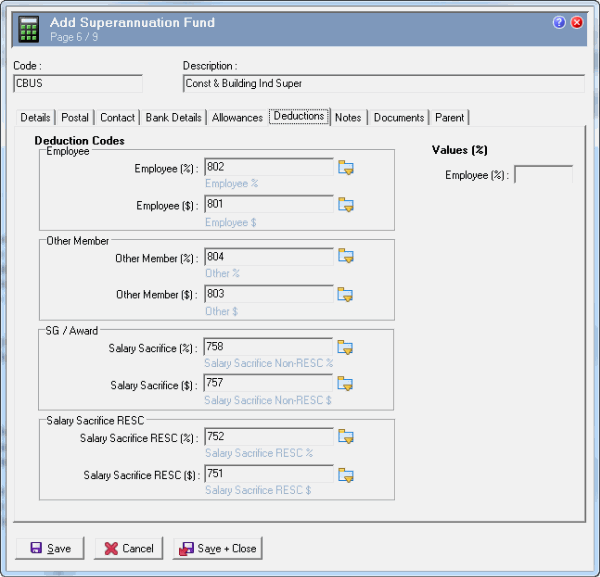
The Deductions tab fields contain deduction codes that will be used in Transaction View for superannuation contributions. Payroll rules will reference the deduction codes in the Superannuation Funds to generate superannuation transactions. See Create Payroll Rule. Contribution calculations will be based on the values entered in the relevant Employee Super Fund records. You can use the Values (%) – Employee (%) amount as a default value when you create an Employee Super Funds record.
These fields are not mandatory, but you must enter the relevant deduction codes if you want Exolvo to generate that type of superannuation deduction. If you leave any of these fields blank, then the corresponding deduction field will be disabled in Employee Super Funds records associated with this superannuation fund. Exolvo cannot generate superannuation transactions for that deduction for employees attached to this superannuation fund.
Important: You can select only deductions that have Employee $ - Details (iii) tab | Superannuation deduction = "Yes".
Enter the following type of data:
Field |
Data |
Details |
|---|---|---|
Deduction Codes - Employee |
||
Employee (%) |
802 |
U-type deduction that creates the employee’s percentage value. |
Employee ($) |
801 |
U-type deduction that creates the employee’s fixed value. |
Deduction Codes - Other Member |
||
Other Member (%) |
804 |
D-type deduction that creates the Other Member percentage value. |
Other Member ($) |
803 |
D-type deduction that creates the Other Member fixed value. |
Deduction Codes - SG / Award |
||
Salary Sacrifice (%) |
758 |
D-type deduction that creates the non-RESC Salary Sacrifice percentage value. |
Salary Sacrifice ($) |
757 |
D-type deduction that creates the non-RESC Salary Sacrifice fixed value. |
Deduction Codes - Salary Sacrifice RESC |
||
Salary Sacrifice RESC (%) |
752 |
D-type deduction that creates the RESC Salary Sacrifice percentage value. |
Salary Sacrifice RESC ($) |
751 |
D-type deduction that creates the RESC Salary Sacrifice fixed value. |
Note: If you enter a salary sacrifice deduction that has Taxable = "No", a warning message appears, but you can save the Superannuation Fund record. However, Exolvo will not calculate RESC on non-taxable deductions because RESC applies only to pre-tax deductions. |
||
Values (%) |
||
Employee (%) |
(Blank) |
The employee’s percentage contribution to this superannuation fund. When you create an Employee Super Funds record you can copy across this value, and then manually adjust it if required. |
Exolvo uses the following hierarchy to define the Employee (%) value:
|
||
|
|
|
 |
Topic: 11293