

|
|
|
|
|
|
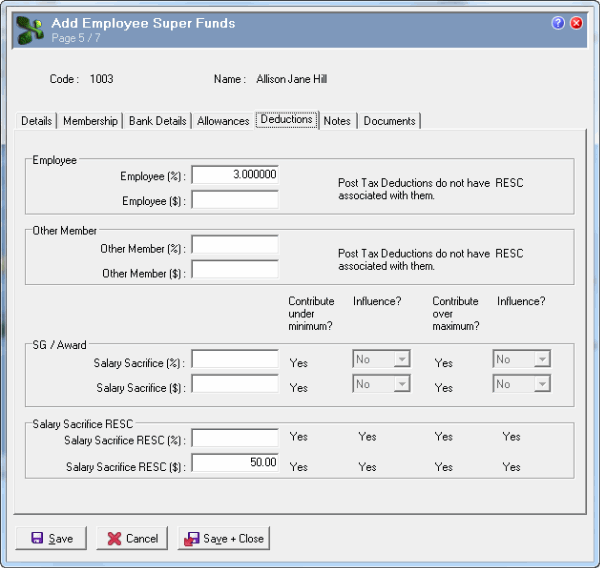
The Deductions tab allows you to personalise employee contributions. When a superannuation payroll rule generates an Employee Super Funds deduction in Transaction View, it uses the Deductions tab field values in the current Employee Super Fund to determine the transaction rate. However, payroll rules cannot generate transactions for a deduction if the relevant Employee Super Funds | Deductions tab field is empty or no corresponding deduction code is specified in the associated Superannuation Fund | Deductions tab (see below).
The Deductions tab contains the following column fields for Salary Sacrifice and Salary Sacrifice RESC fields:
Column Field |
Details |
|---|---|
Contribute under minimum? |
Salary Sacrifice and Salary Sacrifice RESC fields always have Contribute under minimum? = "Yes" because they are paid even if the employee’s salary or wages earnings are below the monthly minimum earnings amount. See Super Settings. You cannot edit these labels. |
Influence? |
Yes/No field that indicates whether the employee was able to influence salary sacrifice contributions paid when the employee’s salary or wages are below the monthly minimum earnings amount or Ordinary Time Earnings are above the maximum quarterly earnings threshold. Contributions that the employee has influenced are reported as RESC. |
Important: Salary Sacrifice RESC fields always have Influence? = "Yes". You cannot edit these labels. |
|
Contribute over maximum? |
Salary Sacrifice and Salary Sacrifice RESC fields always have Contribute over maximum? = "Yes" because they are paid even if the employee’s Ordinary Time Earnings are above the maximum quarterly earnings threshold. See Super Settings. You cannot edit these labels. |
In this example, Allison Hill wants to make the following employee contributions:
Enter the following data:
Field |
Data |
Details |
|---|---|---|
Employee |
||
Employee (%) |
3.000000 |
Value of the employee’s percentage contribution to this fund. Allison will contribute 3% of her superable earnings to the CBUS superannuation fund. Exolvo copied this value from the Superannuation Fund record when you opted to copy across defaults. |
Important: This Employee (%) value overrides the Superannuation Fund | Deductions tab | Employee (%) value. If the Employee (%) value in the Employee Super Fund is zero or blank, then the payroll rule does not generate any employee deduction transactions. |
||
Employee ($) |
(Blank) |
Value of the employee’s fixed contribution to this fund. |
Other Member |
||
Other Member (%) |
(Blank) |
Value of the employee’s percentage contribution to this fund on behalf of another member. |
Other Member ($) |
(Blank) |
Value of the employee’s fixed contribution to this fund on behalf of another member. |
SG / Award |
||
Salary Sacrifice (%) |
(Blank) |
Value of the non-RESC portion of the employee’s salary sacrifice percentage amount for this fund. |
Salary Sacrifice ($) |
(Blank) |
Value of the non-RESC portion of the employee’s salary sacrifice fixed amount for this fund. |
Note: Influence? fields are enabled when Salary Sacrifice (%) or ($) is greater than 0.00. |
||
Salary Sacrifice RESC |
||
Salary Sacrifice RESC (%) |
(Blank) |
Value of the RESC portion of the employee’s salary sacrifice percentage amount for this fund. |
Salary Sacrifice RESC ($) |
50.00 |
Value of the RESC portion of the employee’s salary sacrifice fixed amount for this fund. Allison will sacrifice $50.00 of her pay to the CBUS superannuation fund. |
Employee Super Funds and Superannuation Fund Deduction values
The following fields are disabled if the associated Superannuation Fund record does not contain a corresponding code because Exolvo cannot create transactions for such field values, see Superannuation Fund | Deductions tab:
If you have Employee Super Funds records with values in disabled fields, then you cannot edit them directly. However, when you save such Employee Super Funds records, a message asks whether you want to remove the disabled field value. For example:

If you select "Yes", then Exolvo removes the value from the disabled field.
If you select "No", then the value remains in the disabled field. However, Exolvo will not be able to create transactions for this field value until you add the corresponding deduction code in the associated Superannuation Fund record.
|
|
|
 |
Topic: 14941


