

|
|
|
|
|
|
This example explains how to use a query to display Employee Super Funds that start between 01/07/2011 and 31/08/2011 or end between 01/07/2011 and 31/07/2011.
Start date is between 01/07/2011 and 31/08/2011
Or End date is between 01/07/2011 and 31/07/2011
One inactive fund record has a Start date in the query range.
One active fund record has an End date in the query range.
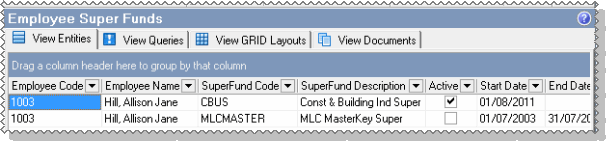
The report shows that one employee (1003) changed superannuation fund in July and August.
Note: The Employee Super Funds makeup table displays superannuation funds that are attached to an employee’s Superannuation tab. The Active column tells you whether an employee’s superannuation fund membership is active or inactive. However, the makeup table can display only employees who are attached to a superannuation fund – it cannot display employees who do not have a superannuation fund membership.
 |
Topic: 11380


