

|
|
|
|
|
|
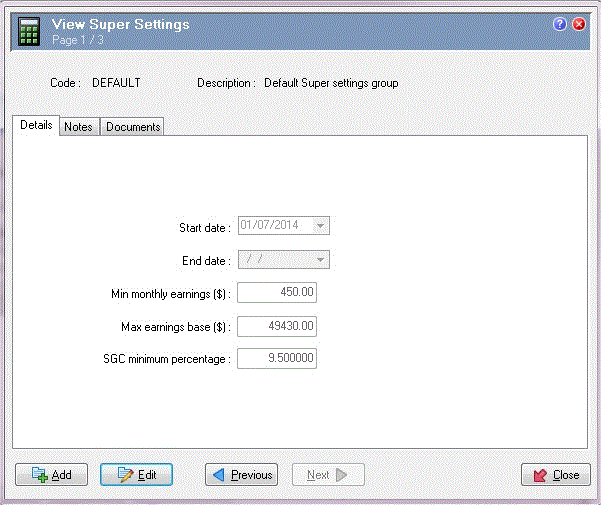
Super Settings are date-effective records that contain values used in superannuation calculations. We recommend creating a new Super Settings record for each financial year, even if the values have not changed.
Field |
Value |
Details |
|
|---|---|---|---|
Start date |
01/07/2014 |
Start date of the superannuation year for this record. This date cannot be later than the End date. |
|
End date |
[Blank] |
We recommend leaving this field blank. When you create a new record for updated ATO values, Exolvo will automatically add an End date value to the previous record. This date cannot be earlier than the Start date. |
|
Min monthly earnings ($) |
450.00 |
Lower limit of employee salary or wages earnings that require employer superannuation contributions The minimum monthly earnings threshold is set by the ATO at the start of each financial year. See Superannuation Rates and Thresholds. |
|
If an employee's salary or wages is less than this amount, then their employer does not have to provide superannuation contributions. However, employers can make superannuation contributions on earnings below this minimum based on an award or agreement. |
|||
Max earnings base ($) |
49430.00 |
Upper limit of employee Ordinary Time Earnings (OTE) that require employer superannuation contributions. The maximum earnings base threshold is set by the ATO at the start of each financial year. See Superannuation Rates and Thresholds. |
|
If an employee's OTE is more than this amount, then their employer does not have to provide superannuation contributions for the earnings above this maximum. However, employers can make superannuation contributions on earnings above this maximum based on an award or agreement. |
|||
SG Minimum Percentage |
9.5% |
Minimum Percentage of an employee's ordinary time earnings that is required to be paid by the employer as Superannuation Guarantee contributions. The SG minimum percentage value entered is not used by PayGlobal to override the contribution rules set up on the Employee's Superannuation Fund details. It is currently only used for determining the amount to be reported in the field Employer Super Guarantee Amount on the PGPRSUPA313 - QuickSuper Contributions Export Report. |
|
Pay Processing
If you are using the Exolvo superannuation framework, pay processing requires a current Super Settings record to calculate the contribution thresholds. If the database contains Superannuation QTDs, but it does not contain a current Super Settings record, and the pay contains superannuation transactions, then pay processing will fail.
No SuperSettings Record
Do not enter an End date when you create a Super Settings record. If you enter an End date (such as 29/09/2014) that occurs before the Date to (such as 30/09/2014) of the associated Superannuation QTDs, when you try to process a pay that includes those dates, the following error message appears in the audit log and pay processing fails:
ERROR There is no SuperSettings record for this pay period, process failed
This message would also appear if you had not set up a Super Settings record that included the pay period.
To identify the employees affected, you would need to run Process Pay with Process = "Changed Transactions" and Detailed log = "Yes".
RESC
Pay processing procedures for superannuation calculations will generate a RESC value only if the pay's accumulators include a Superannuation PTD and a Superannuation QTD code.
Thresholds
Exolvo bases minimum threshold checks on the Superannuation PTD associated with that pay, and maximum threshold checks on the Superannuation QTD. See Superannuation Rates and Thresholds. If an employee's superannuation details change, you need to:
Important: If you change an employee's superannuation fund or their contribution and influence details part-way through a Superannuation PTD, then you would have to add an adjustment transaction to correct their values.
Scenario: Employee changes to an award with a lower Min monthly earnings ($) amount in the third week of a Superannuation PTD.
Week |
1 |
2 |
3 |
Min monthly earnings ($) |
450 |
450 |
350 |
Earnings |
200 |
200 |
200 |
Super contribution (9.5%) |
0 |
0 |
19.00 |
The employee did not cross the minimum threshold until Week 3 and Exolvo calculated their superannuation contribution as: 200 * 9.5% = $19.00. However, their contribution should have been 600 * 9.5% = $57.00 so you would need to enter an adjustment of $38.
|
|
|
 |
Topic: 24512


