

|
|
|
|
|
|
If you want to import RESC values into Exolvo, then you need to:
Field |
Max Size |
Details |
|---|---|---|
Employee Code |
12 char |
Mandatory |
RESC Amount |
8 char with 2 decimal places |
Mandatory |
Allowance Code |
12 char |
Mandatory If SuperFund Code is populated, then the allowance must be linked to the superannuation fund. If SuperFund Code is not populated, then the allowance must be Type = Z or A, Paying = "No", and Superannuation = "Yes". |
SuperFund Code |
12 char |
Optional Use this field only if the imported transactions will be used in the Exolvo superannuation framework. The SuperFund Code must be linked to the Employee Code and Allowance Code in the Exolvo superannuation framework. However, it does not have to be active for the pay period selected. You can import RESC Amount values retrospectively for a superannuation fund active in the past or present. |
The SuperFund Code field is optional because you can import transactions for superannuation calculated outside the Exolvo with no superannuation funds set up for the employee. RESC import files include this feature to cater for external salary packaging and salary sacrificing.
Example:
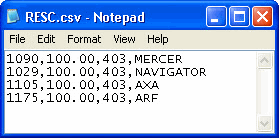
RESC amounts without a SuperFund Code
If the database contains a generic allowance code used across multiple superannuation funds, and you import RESC amounts without a SuperFund Code for an employee whose superannuation fund uses this allowance code, then a warning will appear when you process the pay because Exolvo recognises that this allowance is linked to a current Employee Super Fund. To avoid this problem, we recommend that if you import RESC amounts without a SuperFund Code, then you create a new allowance for the import that is not used in any superannuation funds.
|
|
|
 |
Topic: 27167


