

|
|
|
|
|
|
You need to process the Actual pay to create payments.
You are in the main PayGlobal window.
The Process Actual Pay form appears.
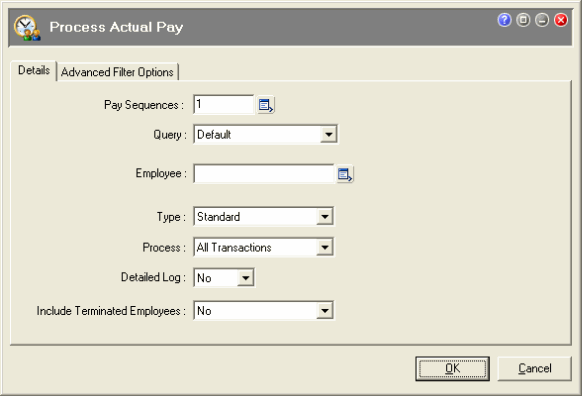
Field |
Details |
|---|---|
Pay Sequences |
In the Pay Sequences pick list, click the checkbox for the Actual pay to process and click OK. The number in the Pay Sequences field refers to the total number of pays selected, not the pay sequence number. |
Query
|
You can select a query to process the Actuals for a group of employees. To process for all employees, select Default. |
Employee |
You can select an employee to process the Actuals for one employee. To process for all employees, leave this field blank. |
Type |
Select Standard. |
Process |
Select All Transactions. |
Detailed Log |
Select No to display only the result. If you need to troubleshoot processing, then select Yes to see the rules that are applied during processing. |
Include Terminated Employees |
Select Yes or No depending on whether you want to include terminated employees. |
The progress is displayed in the Schedule Info window.
 to confirm the status of your Actual periods.
The Actual pay that processed should appear on the TA Seq tab page with a green tick beside it. The green tick indicates that this Actual pay is open and processed.
|
|
|
 |
Topic: 8559


