Approve or Decline Development Plan
If the Status beside the employee's name is "Proposed", then the employee has submitted their Development plan for you to approve or decline.
Click the View details icon  to review the plan and then approve or decline it.
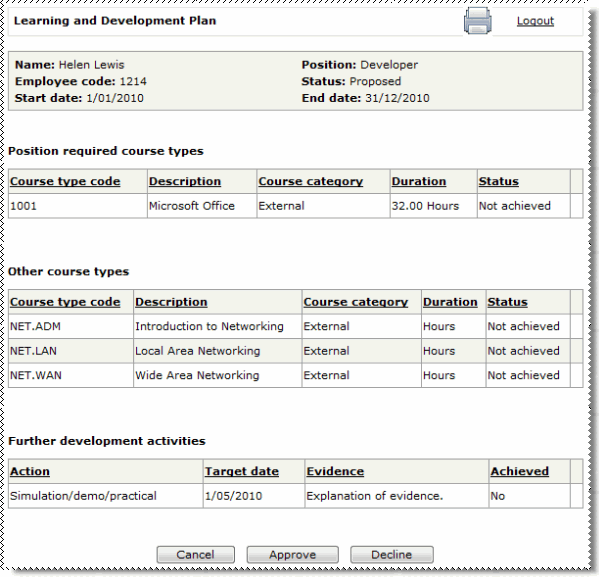
Approve the Development plan
- Click the Approve button.
- You return to the Learning and Development Plans page.
- The status of the employee's plan is now "Approved".
- The employee is sent an email to notify them that you have approved their plan.
After you approve an employee's plan, you can still send it back to the employee to edit and resubmit. When you click the Edit icon beside an employee's name with Status = "Approved", the employee's approved plan opens, which has a Revise button at the bottom of the page. For example, you can use this process for 6 monthly reviews of each employee's Development plan.
- Click the Revise button.
- The following message appears: The Learning and Development plan has now been sent back to the employee for revision.
- The status of the employee's plan is now "Pending". The employee must edit and resubmit their plan.
- The employee is sent an email to notify them that you have requested a discussion regarding their Development plan.
Decline the Development plan
- Click the Decline button.
- You return to the Learning and Development Plans page.
- The status of the employee's plan is now "Pending". The employee must edit and resubmit their plan.
- The employee is sent an email to notify them that their Development plan is due for review.
Topic: 28190




