

|
|
|
|
|
|
Employee's use the Development Plan page to create and submit their Development plan (see Employee - Development Plan). After you approve an employee's Development plan, the employee can book themselves on the course types that they requested in their plan.
Use Development Plan Approval to manage Development plans for employees who report directly to you. You can approve or decline plans, send the plan back to the employee to be revised, create a plan for an employee, or edit an employee's plan.
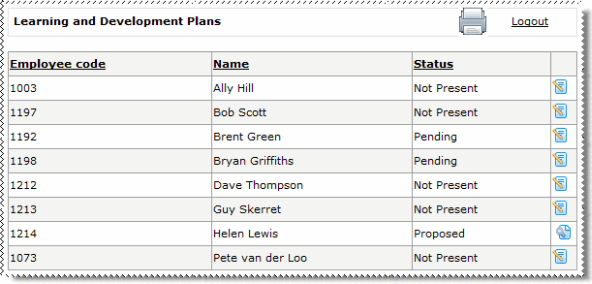
In the navigation menu, click Manager Learning & Development | Development Plan Approval.
|
The View details icon appears beside records that have been submitted for approval (Proposed) or have been approved (Approved). |
|
The Edit icon appears beside records that do not have a current plan (Not Present) or the plan has not been submitted (Pending). You can create plans on behalf of your employees. |
The following options are displayed in the Status column.
The employee does not have a current Development plan. You can click the Edit icon to create Development plans on behalf of your employees.
The employee has a current Development plan, but they have not submitted it for approval or you have declined their plan so that they can edit and resubmit it.
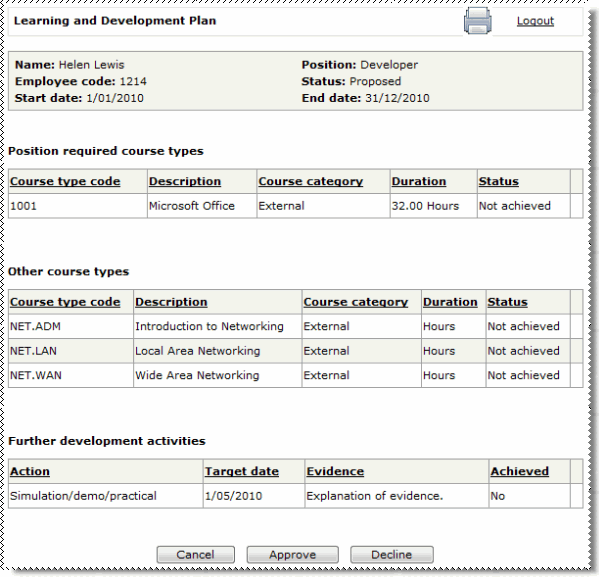
The employee has submitted their Development plan, so now you need to approve or decline the plan. Click the View icon to review the plan and then approve or decline it.
You have approved the employee's Development plan. The View icon appears beside the plan to enable you to initiate a revision of the employee's plan. When you view the employee's plan and click the Revise button, the status changes back to "Pending".
 |
Topic: 28187


