

|
|
|
|
|
|
When an employee leaves a company, the company may ask the employee to complete an exit questionnaire about why they are leaving and to give their general opinions about the company.
If you are leaving the company and you are required to complete an exit questionnaire, then you will see the Exit Questionnaire menu item (your Self-Service administrator configures the location of the item in the menu). A message may also appear on the home page to notify you that you have an exit questionnaire to complete.
The image below shows an example of a questionnaire. The questions that are displayed depend on the questions that are set up for you.
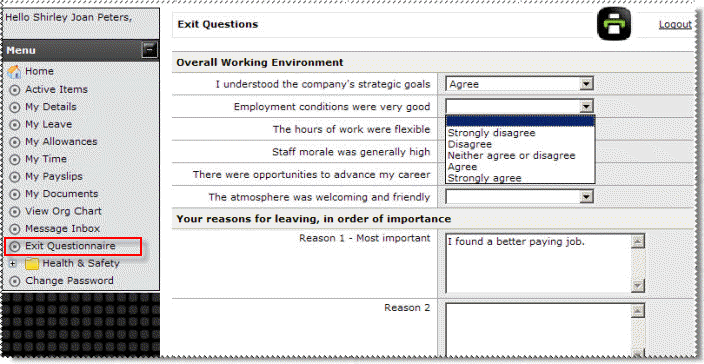
The first set of questions in this example require a response from a graded list, so you would select the answer from the combo list. The second set of questions in this example do not require a numeric response, so you must enter your answer in the free text field (maximum of 500 characters).
The following message appears with the Undo link: Your exit questions have been successfully submitted.
 |
Topic: 29222


