

|
|
|
|
|
|
You can use ESS to submit a request to transfer or promote an employee.
When you transfer an employee, any outstanding requests that they have (such as leave requests), will be reassigned to their new manager.
The following example explains how to submit a request.
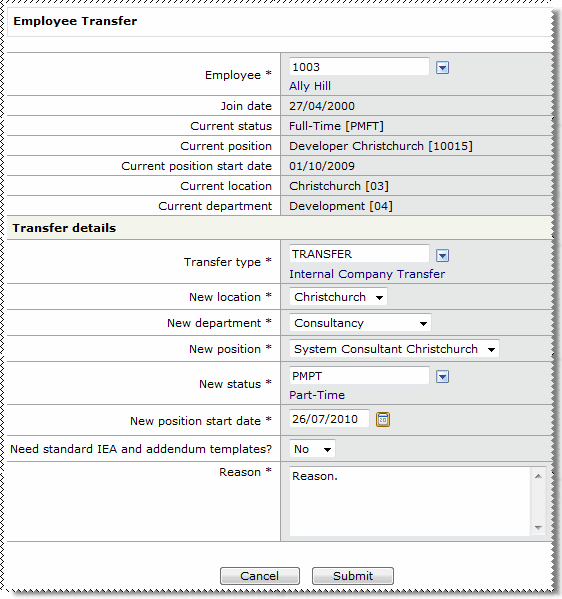
Note: Mandatory fields are marked with an asterisk (*).
Field |
Details |
|
Employee* |
When you select an employee, these fields are populated from the employee’s record. |
|
|
||
Join date |
||
Current status |
||
Current position |
||
Current position start date |
||
Current location |
||
Current department |
||
Transfer details |
||
Transfer type* |
For example, “Internal Company Transfer” or “Promotion”. |
|
New location* |
Select from the list of available locations. |
|
New department* |
Select from the list of departments available at the above location. |
|
New position* |
Select from the list of positions available in the above location and department. |
|
New status* |
Select from the list of employee status types. |
|
New position start date* |
Select a position start date from the calendar. |
|
Need standard IEA & Addendum templates? |
Click the checkbox if you require the following templates: |
|
Reason* |
Enter additional information about the transfer. |
|
The request is saved in your Active Items and the following processes occur:
When the request is submitted, the creator’s manager is notified by email that the request was made.
If the request is approved, then the creator is notified by email. If they required the IEA or Addendum templates, then the templates are attached to the email.
Relevant areas of the company are notified of the transfer by email.
If the request is declined, then the creator is notified by email.
Important: On the New position start date, ESS updates the database with the employee's transfer details.
 |
Topic: 30172


