

|
|
|
|
|
|
You can use ESS to submit a request for a new position or role. The requested role can be for an existing position (you are requesting a new employee) or for a new role.
The following example explains how to submit a request.
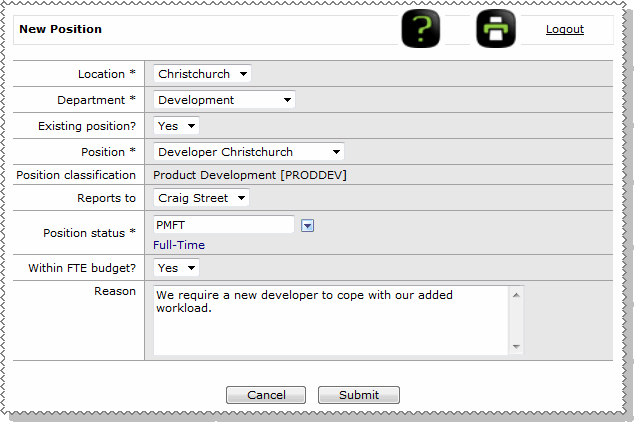
Note: Mandatory fields are marked with an asterisk (*).
Field Name |
Details |
|---|---|
Location * |
Select from the list of available locations. |
Department * |
Select from the list of departments available at the above location. |
Existing position |
Yes/No field that controls the Position field: "No" displays a text box; "Yes" displays a combo list. |
Position |
When Existing position = "No", enter a description for the new position. When Existing position = "Yes", select from the list of positions available in the above location and department. |
Position classification |
Type of position, such as Clerical, Manager, or Sales. |
Reports to |
Select from the list of managers in the selected department. |
Position status |
Status, such as Full-Time, Part-Time, Casual or Contractor. |
Within FTE budget? |
FTE stands for Full Time Equivalent. Select “Yes” or “No”. |
Reason |
Memo notes are required if Within FTE Budget = No. |
When you submit the request, the New Position is saved in your Active Items and the following processes occur.
If the request is approved, then the creator is notified by email. The HR Advisor and Recruitment are notified of the request details by email (if this functionality has been set up).
If the request is declined, then the creator is notified by email.
Important: ESS does not automatically create the new position. The details are sent to the HR Administrator and Recruitment for processing (if this functionality has been set up).
 |
Topic: 33412


