|
|
|
|
|
|
ESS also displays public holidays and leave requests on timesheets.
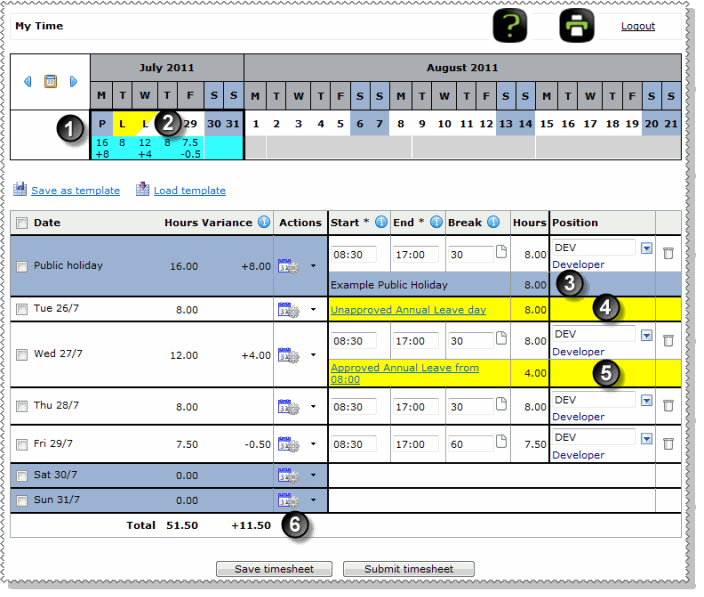
The table below the following image explains the numbered leave features on the timesheet grid.
|
Public holiday on calendar: Public holidays are highlighted blue. |
|
Leave on calendar:
|
|
Leave and timesheets Even if you normally have the security to edit and delete your leave requests, neither you nor your manager can add, edit or delete a leave request if the start date of the request is in a period that has an approved timesheet or an approved timesheet day. |
|
Public holiday hours: Public holidays are displayed in a separate row. The description of the holiday is shown in the first column and the background of the description cell and the day are highlighted blue. |
|
Load template If you apply a saved template to a leave day or a public holiday, then any hours in the template are not automatically adjusted for the holidays. You may need to adjust your hours. |
|
Leave - full day: Full leave is displayed in a separate row. The type and whether the request is approved are displayed in the yellow highlighted area. |
|
Leave - partial day: Partial leave is displayed in a separate row. The type, start time, duration and whether the request is approved are displayed in the yellow highlighted area. Adjust the timeband to reflect the time that you actually worked. |
|
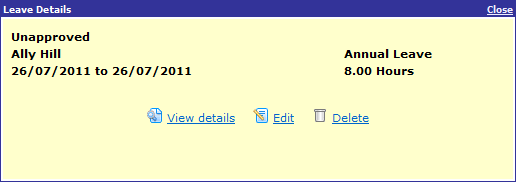
Note: Click the blue leave request link (second column) to view more information about the request in a popup (if the link is red, then see Leave in roster). The View details link allows you to view your leave request, and you may also be able to edit or delete approved leave requests (see Editing Leave Requests).
|
|
Variance: ESS compares the hours you were scheduled to work (set up in PayGlobal) against the hours entered in your timesheet. Leave requests and public holidays are also included in the Variance calculation. |
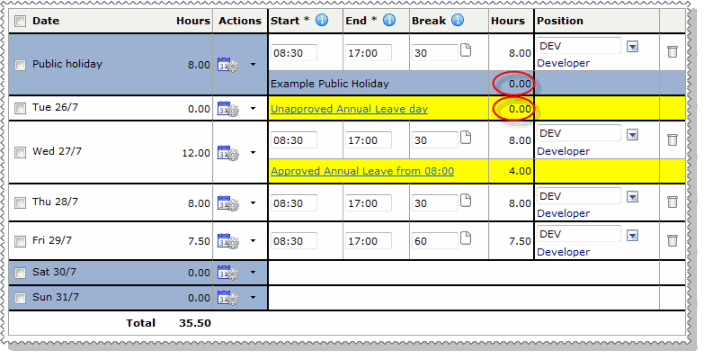
If ESS is set up so you cannot see the variance (explained above), then the public holiday and full leave day values are not populated.
You do not need to enter these values because they will be automatically completed when your pay is processed.
 |
Topic: 37022


 Days that you have submitted a leave request for less than 1 full day are highlighted with a yellow triangle.
 Days that you have submitted a leave request for 1 or more full days are highlighted yellow.