

|
|
|
|
|
|
Behaviours are typically part of your company's values, mission or vision statements. One set of behaviours applies to everyone in your company.
You need to click the edit icon  beside each Behaviour record on the Performance Review page, and then complete your rating and supporting comments.
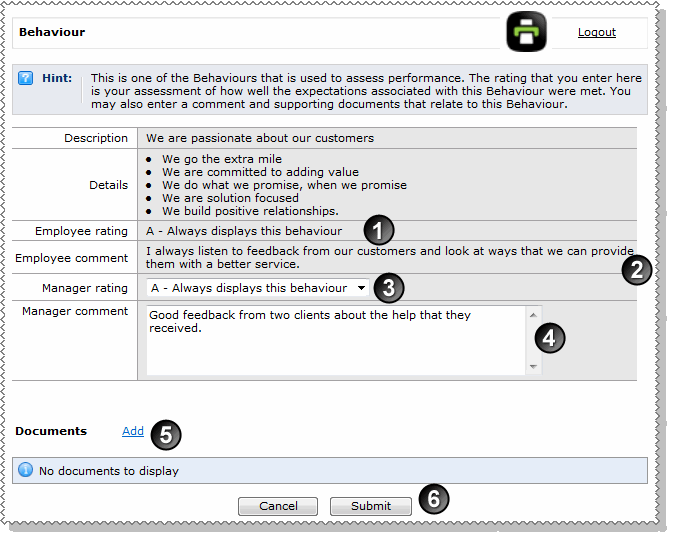
The different sections of the Behaviour page are explained in the following table and image.
|
Employee rating: The employee's performance rating for this behaviour. These ratings are configured by your company. |
|
Employee comment: The employee's list of key achievements to support or reinforce the rating that they gave themself. |
|
Manager rating: Rate the employee's performance for this behaviour. These ratings are configured by your company. |
|
Manager comment: Enter a comment to support or reinforce the rating that you gave the employee, and to give feedback about the comment that they wrote. |
|
Documents: Click |
|
Submit: Submit the completed behaviour to return to the Performance Reviews page. |
|
|
|
 |
Topic: 41199


 to attach a document or image that relates to the employee's performance. If the employee has attached a document, then click the link to open the file.