

|
|
|
|
|
|
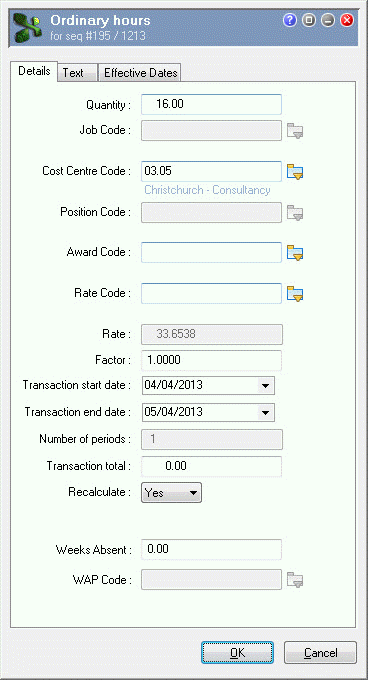
This topic shows how to add an ordinary hours correction transaction for the 16 hours (04/04/2013 and 05/04/2013) that Guy Skerret worked in Consultancy.
You are on Guy Skerret's employee record in Transaction View for the manual pay.
The Select Allowances form appears.
The Ordinary Hours | Details tab appears.
Field |
Value |
Details |
|---|---|---|
Quantity |
16.00 |
|
Cost Centre Code |
03.05 |
Select from pick list. |
Transaction start date |
04/04/2013 |
First day in this week that Guy worked in Consultancy. |
Transaction end date |
05/04/2013 |
Last day in this week that Guy worked in Consultancy. |
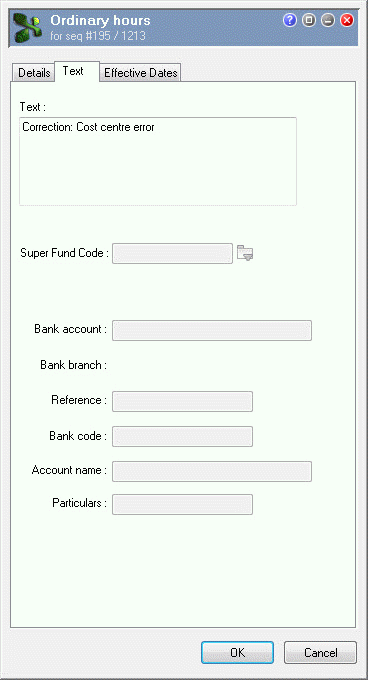
Use the Text tab to add an explanation for your transaction.
Correction: Cost centre error.
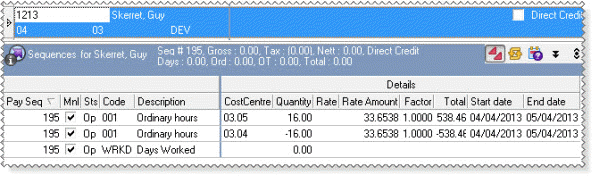
Guy Skerret’s total pay is zero and his 16 hours are charged to the correct cost centre.
|
|
|
 |
Topic: 23363


